the chuck won't tighten to hold any tool.
If I recall correctly, the PSB 650 is one where there is a large rectangular button on the top, just behind the chuck. You have to press this button down to lock the spindle while turning the outer part of the chuck to loosen or tighten it's grip in the drill bit.
You should notice that the button resists being depressed until you turn the chuck a little - it is basically a locking pin that drops into one of a set of recesses around the spindle mechanism.
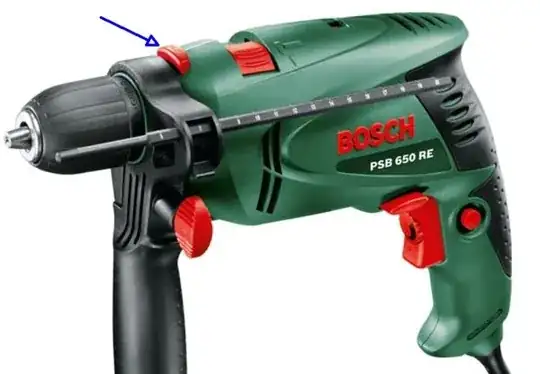
Note that this can catch you out if you are unfamiliar with the tool, or have been using other tools with keyless-chucks which don't need this button.
This is why this tool is such good value. I have the similar PSB 680 as a frills-free basic back-up drill.
If pressing the button has no effect it probably means that it has been held down while the drill was in operation, resulting in damage to the detents/recesses, rounding-over their edges and preventing the locking pin from being able to lock the spindle.
Can the chuck be ... replaced?
Yes.
Replacing the Drill Chuck (PSB 650 RE/PSB 6500 RE/PSB 650 RA)
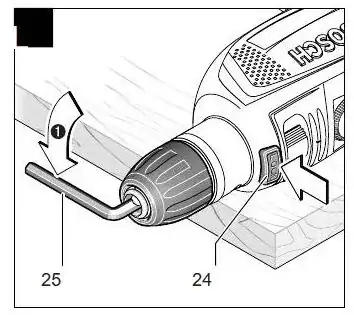
Removing the Drill Chuck (see figure L)
Clamp the short end of an Allen key 25 into the
keyless chuck 2.
Place the machine on a firm surface, e. g. a
workbench. Hold the machine firmly, press the
spindle lock button 24 and loosen the keyless
chuck 2 by turning the Allen key 25 in rotation
direction
Loosen a tight keyless chuck by giving the long end of the Allen key 25
a light blow.
Remove the Allen key from the keyless chuck and completely unscrew the keyless chuck