-6

On my USB enclosure of laptop hard disk, there are two screws on both sides in the picture. enter image description here

I have tried to use one screw driver in the left panel of my toolbox, and its head can fit into the screws, but I cannot unscrew them. enter image description here

I wonder what I can try now?

Tester101
  • 133,087
  • 80
  • 327
  • 617
Tim
  • 821
  • 6
  • 13
  • 22

3 Answers3

4

Screws are sometimes "locked" using a type of "glue" to keep them from coming loose, especially in settings where there is vibration (such as spinning disks). There are different levels of this locking material, some that are meant to be loosened and some that are intended to be permanent.

If this is what is holding your screws in, it is highly likely to be the removable type. Sooner or later someone needs to get into that case. You may need to use a bit more force than you think. But please heed BMitch's instructions about a tight fit. Generally you need to use the largest bit tip that will fit fully in the head slots.

To avoid stripping the head, you also need to apply downward pressure as you twist - to keep the tip from "camming", that is lifting out of the slot.

bib
  • 33,975
  • 10
  • 68
  • 102
3

The drivers on the left are for really small electronics or things like jewelry. For your project, try the smallest Phillips bit in the green handle. Make sure it fits snug in the screw head (if it's loose or doesn't fit, you'll strip the screw head; try the next size up or down).

bib
  • 33,975
  • 10
  • 68
  • 102
BMitch
  • 43,263
  • 15
  • 98
  • 204
3

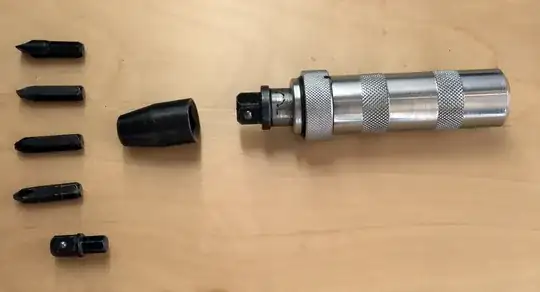
For really stuck screws, you can use a manual impact driver.

enter image description here

  • Attach a bit that fits snugly in the screw slot
  • Set the driver to spin in the proper direction (this process varies from tool to tool, but most commonly, you'll compress the driver and twist).
  • Place the driver on the screw, and hold the driver as straight as possible (keep you hands away from both ends of the tool).
  • Give the back side of the driver a whack with a hammer (a rubber mallet or non-marring hammer is good for this).
  • Repeat until the screw starts to twist (most impact drivers have to be "reset" between strikes, so don't forget to reset the driver before whacking it again).
  • Once the screw is freed up, use a regular screwdriver to remove it.

This may not always be the best tool when working with sensitive electronics or delicate equipment, but it's very useful for removing stuck screws.

If you still cannot remove the screw, as a last resort you can drill the screw out.

  • Select a drill bit that is just smaller than the shaft of the screw you want to remove (you may have to guess if you can't see the whole screw, but you can always go bigger later so start small).
  • Place the bit in a drill.
  • Place the tip of the bit in the center of the head of the screw.
  • Drill until the screw comes free, or until you think you are deep enough.
  • If the screw did not come free, switch to a slightly larger bit and drill again.

This is a last-ditch effort, and will destroy the screw (and possibly the threads in the hole, if not done correctly). Use this technique only as your last resort.

Tester101
  • 133,087
  • 80
  • 327
  • 617