14

I installed an Ecosmart 27kw tankless water heater yesterday and as far as heating the water goes, everything works perfectly.

The issue is when the water heater is running, I lose internet!

Specs:

  • Heater is 240v 27kw @ draw 112.5amps
  • Breakers are 3x 40amp dual pole across both sides of the split phase
  • Wiring is 3x 8awg
  • My internet is 10mbit ADSL down the phone line.

--

My suspicion is that the high amp lines are creating an electrical field which is interfering with the low voltage phone line system, killing my internet.

When turning on the hot water, I loose access to ping google.com, however I can still ping 192.168.2.1 [my router] which says it's not the router that's being interfered with via power loss.

Any recommendations regarding minimum distance between the high amp cables and the phone line. Am I even on the right track here?

Thanks - Jon


Update: Fixed by installing a new phone line externally, 2 meters away from the high amp lines with cat7 cable.

Jon Barker
  • 263
  • 1
  • 9

5 Answers5

7

First, make sure that your three supply cables are paired properly. The unit has 3 heaters internally. There are several ways cables could be crossed that would result in power from 1 heater coming up one cable and returning on another cable. The heater would work properly, but would kick stupid large amounts of EMF from the two imbalanced cables. Just double-check it.


Or, the heater may be throwing high frequency electromagnetic hash, with the cable(s) becoming antennas and making this worse. Now, electric resistive heating elements, alone, do not throw electromagnetic hash. That would only happen from

  • a) control electronics, which will surely only be on one cable/circuit; or
  • b) power choppers ("dimmers") which could be on 1 or all of the circuits, but there'd be no useful reason to have them on more than 1 circuit.

Also, there's a thing I don't like about how Ecosmarts are installed - they expect you to cram three #8 cables through one 1" hole, which is a lot to ask, and requires just the right cable clamps to not violate Code.

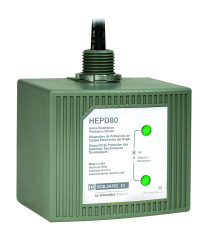
I would install a 6" square deep or larger metal box right below the EcoSmart and a short EMT conduit nipple connecting it to the EcoSmart's wiring hole. Bring the 3 cables into the large box with correct clamps; leaving space for up to 3 "surge suppressors" to be fit onto 3 knockouts.

Then I would consult with EcoSmart and ask them a) which circuit powers the control electronics and b) whether they merely switch all 3 heaters, or whether they use power choppers, and if they do, on which circuit(s).

On the circuits which do not use choppers or electronics, those can be wired straight through the 6" box, up the conduit nipple and to the terminals.

For the circuit(s) which do use choppers or electronics, you run a pigtail from the EcoSmart's terminal into this box. Then you mount a "surge suppressor" in one of the knockouts (or not, if it's a type that can live inside the junction box e.g. Meanwell SPD-20-277P). Then join those wires to the power line from the panel. This wires the Ecosmart and the suppressor in parallel (the usual way you "tee" a connection) - it's not wired in series like a switch.
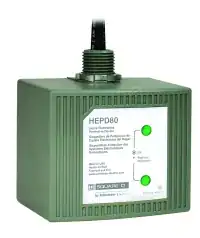
enter image description here

At this point, the surge suppressor(s) should be damping out the EM interference before it leaves the metal faraday cage of the Ecosmart + junction box.

I suppose Ecosmart could build this into the product, but that would raise the price-point, and so you might not have selected the product.

Harper - Reinstate Monica
  • 313,471
  • 28
  • 298
  • 772
5

Long shot...if I'm wrong I'll delete.

112 Amps is a HUGE draw. As you probably know, many houses have a total 100 Amp (sometimes less) service. If your service drop isn't significantly larger, or even if it is but the utility didn't provision it well (e.g., they can, as I understand from other questions regarding service-entrance vs. "other" cables for 100A and similar sizes, downsize a good bit based on normal expected usage), then you could have a significant dip every time the heater kicks in. While the DSL modem is likely designed to handle a range of voltages, that still might be enough to cause problems. Similar to the way a laser printer on a 15A circuit can cause enough of a dip to reset some devices or at least to lower voltage enough for a few seconds that a UPS will treat it as an outage.

The right way to test this would be to monitor the voltage on the line powering the DSL modem as the heater starts up. If your voltages drops from 115V to 95V (or something like that) then the modem may simply not handle the low voltage and/or the voltage change well and lose the signal.

The secondary ways to test this are:

  • See if lights (especially incandescent as LED will often handle voltage fluctuations just fine) dim when the heater starts up.
  • Plug the modem (and while you're at it, the router and any other nearby computer-related devices, except laser printers) into a UPS. I use APC, but any decent model will do fine and I think it is a great investment - one didn't-reboot-during-a-thunderstorm can make it worth it even if it doesn't help for this problem. If the internet stays "live" with the modem & router on a UPS then you have your answer - and your fix.
manassehkatz-Moving 2 Codidact
  • 139,495
  • 14
  • 149
  • 386
5

Something you might want to consider here is that your phone line inside the house is probably something crappy and unshielded. Cat3, for instance, offers virtually no shielding at all. What I would suggest is upgrading your phone line from the box to your modem with something that is better shielded, like Cat6. If you can afford it, going even higher (Cat6a or 7) would afford you greater shielding. 10MB down a copper line is probably highly susceptible to even minor interference.

Machavity
  • 26,498
  • 8
  • 44
  • 100
2

Find out what the DSL modem sees.

DSL is designed to detect and avoid all kinds of interference entering the line. Technically, it splits up the whole band into many narrow channels, continuously monitors them for noise and only uses the noise-free ones to transmit data. Any interference should thus just make the line slower but not kill it completely. Also, the low-frequency end of the spectrum is often reserved for voice and completely ignored by DSL, so the 60 Hz current into the heater might not matter at all.

Instead of playing around with the heater to try to figure out what's going wrong, check out the diagnostics on the DSL modem. When you log into its web management interface (by entering its IP address into your address bar and logging in, possibly with default passwords that should be either in the manual or on a label on the unit), you should be able to find some "DSL Status" tab showing what's actually going on with the line.

There will be something like Line State saying up, showtime, synchronized or so. Does that change when you flip the breaker?

If it doesn't, look for something like Noise Margin. That will probably change a lot if the line starts picking up a new source of interference. That in turn leads to Attainable Data Rate dropping as the modem stops using the noisiest channels.

There will also be something like Line Attenuation and Signal Attenuation. This probably won't change as it measures how much signal is lost along the way to the DSLAM.

TooTea
  • 2,407
  • 14
  • 23
1

112A will induce voltages in any cables (phone connections) anywhere near that massive power-line you have.

What is meant by the term "split-phase" - is this single phase or guessing by the use of "3x 40amp dual pole breakers" a system where a 3 phase supply is split into 3 single phases?

If so, I strongly doubt it meets current electrical regulations...

Jeremy Boden
  • 181
  • 6