3

I just bought a set of Nest Protects and after opening the first one I noticed that its manufacture date was almost a year ago and that the expiration date was 10 years from the manufacture date, not from the install date. So effectively the units cost 10% more than their list price.

My reading of the Nest Protect manual is that the units will start nagging you to replace them a couple of weeks before the expiration date and that they will become quite insistent once they "expire."

A call to Nest wasn't too productive, but I did learn that:

  • I shouldn't expect the Protects to last 10 years - more like 7 or 8.
  • They actually start counting the 10 years from the install date - but supposedly this doesn't show up in the app. If I want to check the expiration date I can look at the back of the unit… Hopefully what they mean is that I can calculate it myself from the install date that I can write in the space that they provide.
  • That if I want to get fresh units I can have the store open them up for me to check the expiration dates (they are not printed on the outside of the packaging).

Needless to say I'm underwhelmed by the quality of the support.

Does anybody know:

  • If the date does show up in the app?
  • If it does, is it recalculated based on the installation date?
  • How the Protect behaves when it reaches its expiration date?
  • The typical age of units in stores (i.e., is the retail pipeline really almost a year long)?
  • Sources that are likely to have fresh stock?

Thanks. I think I still like the units, but would sure appreciate better customer support.

dlu
  • 548
  • 1
  • 7
  • 23

5 Answers5

3

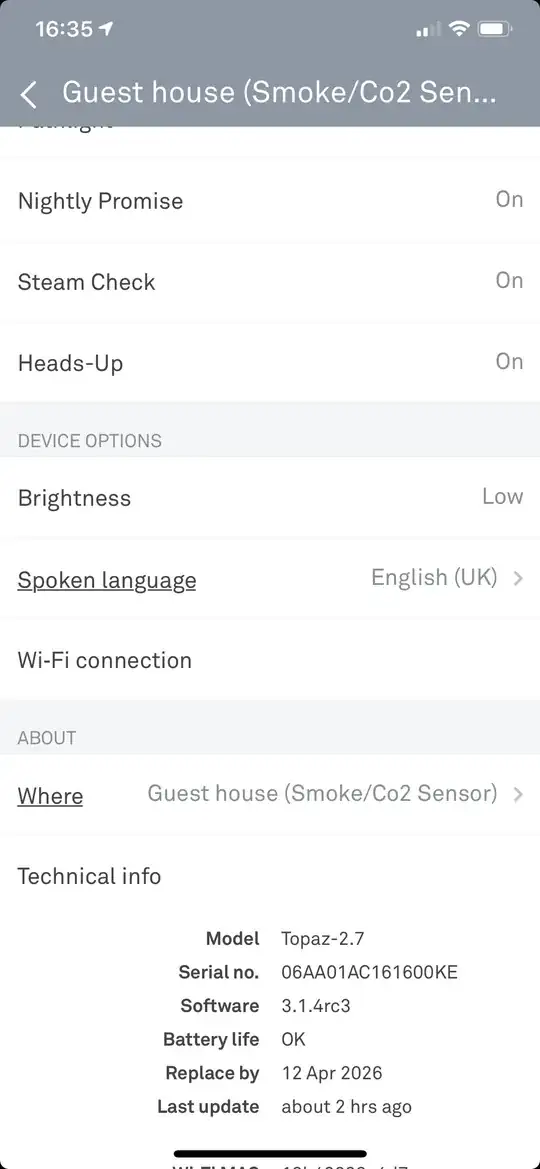
As you can see mine shows replace by April 2026 although I didn’t buy them until end of Aug 2018 and fitted them a couple of months later. I’d better start saving up for the next ones now!

enter image description here

So i didn’t get the full product at a discounted price, simply received a reduced lifetime at a higher prorata cost :(

Can’t tell you about the end of life nagging but i suggest all potential customers wait till my 2026 expiry, when i will be able to give clarity. before buying unless Nest want to answer your question sooner?

Daniel Griscom
  • 6,319
  • 33
  • 33
  • 43
Zip13
  • 31
  • 2
1

The expiration of any CO detector is based on the DATE OF MANUFACTURE and is usually ten years from that date. It doesn't matter when the device is installed. That date is printed on the back of the Nest detectors, and you can see it in the Nest Protect app.

What I don't understand is why, after the CO element is out of date, Nest doesn't let you continue to use the device as a smoke detector only. Secondly, they should have a refurbishing program where you can send the unit back to get a new CO sensor. Tossing these devices is environmentally unsound (not to mention costly).

LeRoy Tabb
  • 11
  • 1
0

All smoke detectors and CO detectors have 10-year life spans. It is related to the manufacture date - it doesn't matter when you install it.

Peter
  • 137
  • 5
0

I waited a long time to install my 1st Gen Nest, probably at least a year. My manufacturer date was Nov 2013. It told me today, June 2022,that it is expired. Therefore, I would conclude that the expiration is related to the installation date, which is probably initiated by the battery installation.

0

The manufacture date seems to be encoded in the serial number, and an example from @zip13 confirms that.

Here: 06AA01AC161600KE

16 week 2016 year - and the app states an expiry date - April 2026 (10 years later)

If you can find the serial number on a product, you can figure out how long it will last without unpacking or buying.

St.Shadow
  • 101