14

I am building a new home, and want to get fiber internet installed in it. In my current home, the fiber is wired externally on walls, above doors and finally into the living room through a drilled hole. I want this wire to be installed internally (inside walls like electric wires) so that I don't have to see it. As far as I understand, a fiber can't be bent too much, else it won't give required performance and signal speed. So CAN it be wired internally at all? Because as I imagine, internally there would be a lot more bends and curves the wire would have to go through. I tried finding the answer to this, but there doesn't seem to be one. Could someone explain?

So just to clarify: I'm just talking about the one fiber line that comes to a house and provides internet, not wiring all the rooms with it (I didn't even know that could be done or it would be feasible, thanks for informing me).

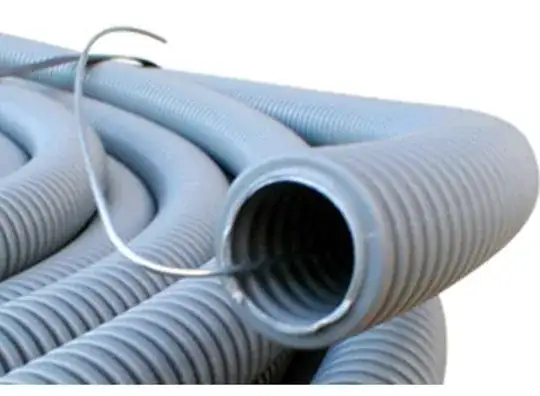
An update: So I understand now that it can be done using conduit generally, but can it be done with this kind of fiber (attaching a photo). Would I need a special kind of long conduit for it? The ISP's fiber line that comes from outside the house into my lobby

Johnnytest
  • 148
  • 1
  • 1
  • 8

9 Answers9

20

So you want access behind the walls to upgrade your network wiring (since it changes really often compared to the lifetime of the house). But, you also want to seal the walls up in drywall, mud and paint like everyone else does. Common struggle.

The answer is conduit

This is pipe that is designed to interconnect electrical junction boxes.

It comes in a variety of forms: flexible, non-flexible, metal or plastic.

Most of them provide for curves called "Sweeps" - which provide an easy, at least 5" radius bend for all curves. Or they use a flexible conduit which naturally limits sharp turns.

I for one dislike plastic because it worsens the escape problem in house fires. Another argument in favor of metal conduit is RF shielding.

I caution against over-use of flexible conduit, because it is springy, and you'll be fighting that springiness while pushing a tape through or pulling a wire through.

Conduits can only have 360 degrees of bend between pulling points (but even that makes pulling difficult for a DIYer). A pulling point can be a junction box, or a "conduit body" - however conduit bodies require unusually tight bends - check whether that's OK for fiber. Such points must remain accessible forever without tools or damaging building surface.

Boxes

A proper junction box has sides and a back, with round knockouts which the conduit enters. That's intended for AC power wiring which must be enclosed, but you're welcome to use it for datacomm (and if metal, provides RF shielding).

Data cables only require a backless "non-box" such this minimalist one. (note swinging ears for clamping to drywall, a second-rate attachment method; this is a retrofit aka "old work" box).

enter image description here

What do you do to make sure the conduit ends are accessible? I suppose you could anchor the conduit firmly somehow to be within ready reach of the opening. Or here's a more robust "new work" box (requiring open studs to attach, but anchors much better) that provides attachment points for conduit.

enter image description here

Again, you're not required to use open boxes or "wish boxes" (wish it had a back), but you're allowed to for datacomm.

Oh wait. Maybe proper boxes are a good idea with fiber.

Because here's an interesting wrinkle with fiber. Fiber is allowed in power conduits provided it is entirely non-metallic. So if you build your conduit network fully NEC Chapter 3 shipshape and in Bristol fashion, you can use them for additional AC power circuits - up to four in fact.

For that matter, you could do a hybrid system where you use full and proper conduit for enough of your AC power that you can just toss fiber in there.

The downside of this "fiber+power" tactic is that you can't have any copper datacomm in there - not cable TV, not Ethernet and not PoE. So if "the next thing" comes out is fiber+copper for low voltage power, you'd be out of luck (since AC and low-voltage can't be mixed).

(because, it's presumed a wire meltdown may occur inside a junction box, with 120/230V live having contact with any other wires in the box. Low voltage wires typically go to places not insulated for that, like out of the wall on an Ethernet and into the back of a PC which connects to other peripherals).

Harper - Reinstate Monica
  • 313,471
  • 28
  • 298
  • 772
13
  • Yes, fiber can be run internally as well as externally. Your vendor may not provide any way to hand off to internal fiber, though, and may prefer to keep their interface external so they don't have to get in the house to service it.
  • Reduced Bend Radius fiber exists, and is very commonly what is used for internal fiber runs. The vendors will demonstrate it working while wrapped around a pencil...but you can still break it if you mishandle it.
  • Conduit is truly the best idea for any sort of networking. Networking has a short life relative to house lifetimes. Conduit allows swapping it out painlessly when the next thing comes along.
  • At the present time most of your in-house networking conduit would likely be better stuffed with wire. The practical realities of POE for distribution to wireless access points and the lack of major advantages for fiber inside a building less than 100 meters in any dimension don't support fiber to every room as a sensible option right now. Fiber is the right way to go between buildings.
  • Do remember to provide ceiling boxes in all major rooms, since high-speed wireless works best without walls in the way of the signals, so an access point on the ceiling (tends to be the most visible) that your end-use device can see is a very good thing. They are generally easily mistaken for smoke detectors if well-designed (don't forget the wiring for smoke detectors, either.)
Ecnerwal
  • 235,314
  • 11
  • 293
  • 637
8

Yes

This is entirely possible to do. However:

  • You should do it in conduit, paying careful attention to the exact geometry of the conduit. This will let you run new cabling when standards eventually change and you want to upgrade.
  • You will probably need ‘reduced bend radius’ cabling. This is more expensive, but if handled properly can make absurdly tight bends.
  • While you could share the conduit with power lines, doing so would mean you could not ever use metal network cabling while still being in compliance with electrical code in most parts of the world.

However...

Fiber provides very specific advantages when you want extremely high speeds or have to transmit signals very long distances or have a specific reason to want no risk of EMI or corrosion.

But it’s got a major disadvantage right now: it’s actually pretty expensive for consumer usage. Pretty much nothing uses a direct fiber NIC, it’s all SFP derivatives. And that all gets expensive pretty fast. You’re looking at hundreds of USD each for each AP and switch, plus anywhere from 20 USD to a few hundred USD per fiber termination module, plus 20 USD each for media converters for each device you want to add to the wired network that doesn’t already have a SFP slot (assuming you don’t want a proper NIC in the system, which will run you hundreds of USD each).

And the reality is, none of those specific advantages of fiber actually provide any benefit in a building the size of a typical house (unless you do a really bad job with the wiring and live in a particularly humid climate) compared to running Cat6A twisted-pair cabling. Unless you are doing atypical things, your home network almost certainly does not need to be any faster than your internet uplink, and given that it’s home internet, you probably do not have access to any better than a symmetric gigabit uplink right now, and likely will not have access to any better than a symmetric 10GbE uplink for a very long time.

This means you can (probably) save a significant amount of money by just running Cat6A cabling instead, which is still good enough to do 10GbE, has the advantage that you can use it for PoE (which makes handling of things like wireless APs much easier), and does not require special hardware anywhere. By using good conduit with a smooth interior and paying proper attention to the conduit geometry, you can pretty easily make it even more future proof by simply making it easy to pull new cables.

6

So, if I understand correctly, you want the fiber to come into your house, then connect to the fiber router somewhere inside the house, without looking ugly on your walls. Then the rest of the house is wired with standard Cat5e or Cat6.

That's what I have done, so here we go.

The guy who will come to install fiber to your house will pull a rather thick fiber cable from the street. This contains a few very thin fibers, with a tough plastic protection sheath around them so it survives being pulled through underground conduits. This fiber cable doesn't have a connector at the end, because that would prevent it from being pulled through conduits. The installer routes this cable to a fiber junction box, then does the junctions, and the router is connected to this box with thinner optical cables. These cables are designed for interior use, so they are quite thin and flimsy.

In a multi-story building, there is usually one junction box per floor, and thin cables running to each apartment. In this case the thin cables can be routed through conduits and walls, because they don't have connectors attached. In houses, they usually put the junction box somewhere easy to install inside or outside the house, then they'll use a readymade patch cable with connectors attached. The connectors will not go through conduit, unless the conduit is huge, like 35mm, to let the connectors through. And they tend to get stuck, and the fiber is fragile, so it's a bad idea to pull these cables with connectors through conduits.
enter image description here

So, you should check how things are done in your jurisdiction. Look how it was done in your neighbor's houses, and call the installer. If they want the fiber junction box outside to be able to service it, then ask if they can route the fiber through conduits you provide, and make sure the installer will come with the necessary stuff, especially the kit to add another junction box at the end of the interior cable, what kind of conduit diameter you need to install, where it should exit the house, etc.

Then, all you need to do is make sure there is a conduit path from wherever the fiber will come from (on the street) to wherever you want to install it. The tough fiber cable doesn't bend well, it is quite rigid to protect the fiber inside. The flimsy cable breaks when it bends. So this conduit shouldn't have sharp angles.

I'd recommend 20mm or 25mm conduit, it's easier to pull through and harder to bend.

These conduits are usually delivered with a steel wire inside, which is mostly useless, it always gets stuck or breaks. So the first thing to do after laying the conduit is to attach a proper tough wire to it, or a tough PP string, and pull it through.

Then leave both ends accessible, and when the installer comes, just tell him to pull the fiber through it. This needs two people, one pulling on one end, and the other pushing the cable in at the other and making sure it doesn't make any knots, so you'll have to lend a hand.

Make sure you have a roll of PVC adhesive tape on hand.

bobflux
  • 11,121
  • 29
  • 35
5

We run fiber inside walls all the time. You can run it just like any other wire just be careful not to pull to hard and stretch it or get any kinks in it and you'll be fine. You can even use round staples to secure it and run it to where your modem is.

MagnumTech
  • 51
  • 1
4

The newly-added photo shows a specific type of fiber cable. The legend on the cable isn't entirely legible but it looks like it says 4F SMF, which means 4 strands of single-mode fiber, and doesn't actually tell us anything about the bend characteristics of the cable.

It appears to be flat drop cable which has typical construction like the photo below: (credit novalight.com)

flat drop cable cross section

This type of cable doesn't bend very well -- it's somewhat easy to break those fiberglass dielectric strength members. The Commscope flat drop product I've worked with can be wrestled down to maybe a 6 inch bend radius (a 12 inch diameter coil of slack in a hand hole in the ground is how I experience it). This cable would go through an ordinary bend in EMT conduit if helped along with a pull string but would break if forced into the tight bend of a conduit body. It also really only bends in one axis: up and down as viewed in this photo; trying to bend this cable "in-plane"

NEC 770.48(A) pertains to "unlisted conductive and nonconductive outside plant optical cables" entering buildings. There's a limit of 50 feet, which may be extended by "continuously enclosing the entrance optical fiber cables in rigid metal conduit or intermediate metal condeuit to the point of emergence." In a single family detached home you'd be unlikely to hit the 50 foot limit, however.

Interestingly, 770.48(B) indicates unlisted nonconductive outside plant cables are permitted to be installed in IMC, RMC, rigid PVC, and EMT conduit. "Nonconductive" means there's no tracer wire conductor, no metallic armor, etc. The one pictured is almost certainly nonconductive. I'm surprised that ENT "smurf tube" suggested by others isn't permitted for outside plant cable too, but there you have it.. I suppose one would comply with 770.48(B) while using ENT by terminating the OSP cable on the exterior of the building and transitioning to some other non-OSP cable to enter through the ENT conduit.

A drop cable like this is going to have to be terminated in some kind of demarcation box, at which point it'll be connected to a patch cable of some sort or a pigtail for immediate connection to the ONU/ONT right there in the demarc box.

The long and short of it is this: Install a conduit. The fiber provider may or may not be willing to bring their outside plant cable through your conduit into the building. If they're unwilling, at least they may place their demarc box near your conduit so that you can run copper or optical cable from there into the house.

Greg Hill
  • 35,866
  • 42
  • 91
2

It depends where you are in the world and what your local fibre-co can do.
Contact your area's fibre-provider/company and ask what is possible for new builds.

EXAMPLE: In New Zealand, there are government-backed fibre providers who are the sole incumbent in a region. They cannot retail services, they are mandated wholesale only. This lets anyone run a dedicated fibre ISP.

In my city, the local company Enable will pre-wire your half-built house with blowtube to the point inside where your fibre termination will be. This is normally scheduled before internal cladding goes in. Once things have progressed closer, they will blow fibre in from the local cabinet and terminate it. Then your ISP can commence service after that date.

Best of all, this is all free to the home owner.

Criggie
  • 11,950
  • 2
  • 26
  • 79
0

Can an incoming optical fiber cable be wired internally in a house's walls?

  • the incoming fiber drop from the utility pole is outdoor rated cable; if that cable [jacket] rating meets the riser rating for cable then yes it could be run within walls
  • recognize the difference between riser rated and plenum rated cabling, as well as electrical cable which has a heating component to it that is the driving factor whereas fiber optic cable is light transmission and there is no heating component associated with it. does the nec (electric) apply to fiber optic cable when fiber has no electrical component, i don't know. probably NFPA and fire and cable jacket material.
  • the answer is not conduit
  • there is riser rated fiber optic cable, plenum rated fiber optic cable, and even armored (i.e. BX) rated fiber optic cable, use it appropriately but u as a residential home would not.
  • u would not run fiber optic all throughout your new house... to future proof it for when terabit speed happens in year 3000. the toolkit to terminate fiber optic is expensive as well has no mainstream network and pc/laptop hardware support fiber optic connectors such as TC or LC, you'll then need media converters at each fiber optic wall jack so running fiber makes no sense.
  • run cat 6 or cat 7 copper throughout your house, connecting to a central location where you have a gigabit unmananaged switch that costs less than $100, so that each room has an rj45 wall jack. Cat 6/7 within the home will support up to 10 gbps keeping any given run less than 100m or 300', if you get a 10 GbE switch. Otherwise 1gbps is fantastic given internet service is at most 2gbps currently with frontier fiber and nobody really needs more than the 500 mbps plan; xfinity was hot sh1t @ 200mbps; and plan for where a wifi router will transmit as all tv's now stream via wifi they don't even offer a hard lan connection.
  • the fiber drop from utility pole only needs to enter the house and be run far enough within to locate an ONT, optical network terminal, which needs 120vac and converts the light stream to electrical; the ONT has 1 input the fiber ST or LC connector and 1 output an rj45 so you are then on cat 6/7 at best anyway. Partial context of your question... you do not run fiber optic all through the house and anyone suggesting so has no clue, the outdoor rated fiber from the pole enters the house and is run to where you want the ONT which could be just inside the exterior wall, or can be run to the deepest depths of the home doesn't really matter.
  • the outdoor rated fiber can enter the house and have a bridge... a disconnect connector, and then some other length of [indoor] rated riser/plenum fiber could be run however within the house to locate the ONT in some preferable place; it would only be one single run of jacketed fiber optic, kinda similar to NM 14/2 and UF-B.
  • for a new home just plan on having a nice hole pre made in the exterior wall or foundation so the tech can feed the fiber or coax or any cable into your house rather than haphazardly drill based on time of day and previous installation difficulty and aggravation.
ron
  • 2,049
  • 10
  • 14
-1

Like posted above all of these answers are pretty dead on.

Running fiber to all locations in house would be top notch speed (which is super badass)...

However for MOST if not ALL of the devices you are looking to hook up to (wifi, tv, xbox, ps, computers etc..) RJ-45 connections are needed.

Like above $$$ you want to set up a household system for great fiber speeds. now that you have fiber at all the locations you want, now you need to use media converters that change from fiber to cat6. now this is just dumping even more money to bottleneck your speeds to devices that don't use the full potential anyways.

I wouldn't recommend wasting the money on fiber through the whole house just yet. The demand for that kind of speed to your devices isn't here yet.

I personally have Welink as an internet provider and I get about 600 up and 600 down; it's amazing. I have all my devices hardlined in with cat6 to an unmanaged 48 port gigabit switch (nothing fancy). I have 2 Google wifi devices (I do need an upgrade from these wifi 6 i.e. a faster connection which these don't provide).

I never have any down time or loading/waiting as long as I'm on the network streaming and downloading in the house is seamless. No need to spend big money for no reason.

Hope this helps.

I've been installing fiber infrastructure and devices for about 14 years now.

Glorfindel
  • 1,187
  • 2
  • 14
  • 20