14

I recently moved to another internet provider who provides FTTH (Fibre To The Home).

Now my powerline adapters are incapable of taking full advantage of the increased speeds. I'm currently using Wifi and losing some speed, and don't really want to run CAT5 cable throughout the house.

Considerations:

I considered buying newer powerline adapters that can handle speeds up to 1000Mbps, but I doubt I will get speed anywhere near that. I only get 70-80Mbps with my current powerline adapters which state they handle anything up to 300Mbps. Wifi gets me to 800Mbps.

I currently have unused coaxial cable wired into all rooms in my house. They were used for satellite TV. The thicker cable in the photo is either RG6 or RG59 cable. The thinner cable is the type used for landline telephones (RJ11/RJ45).
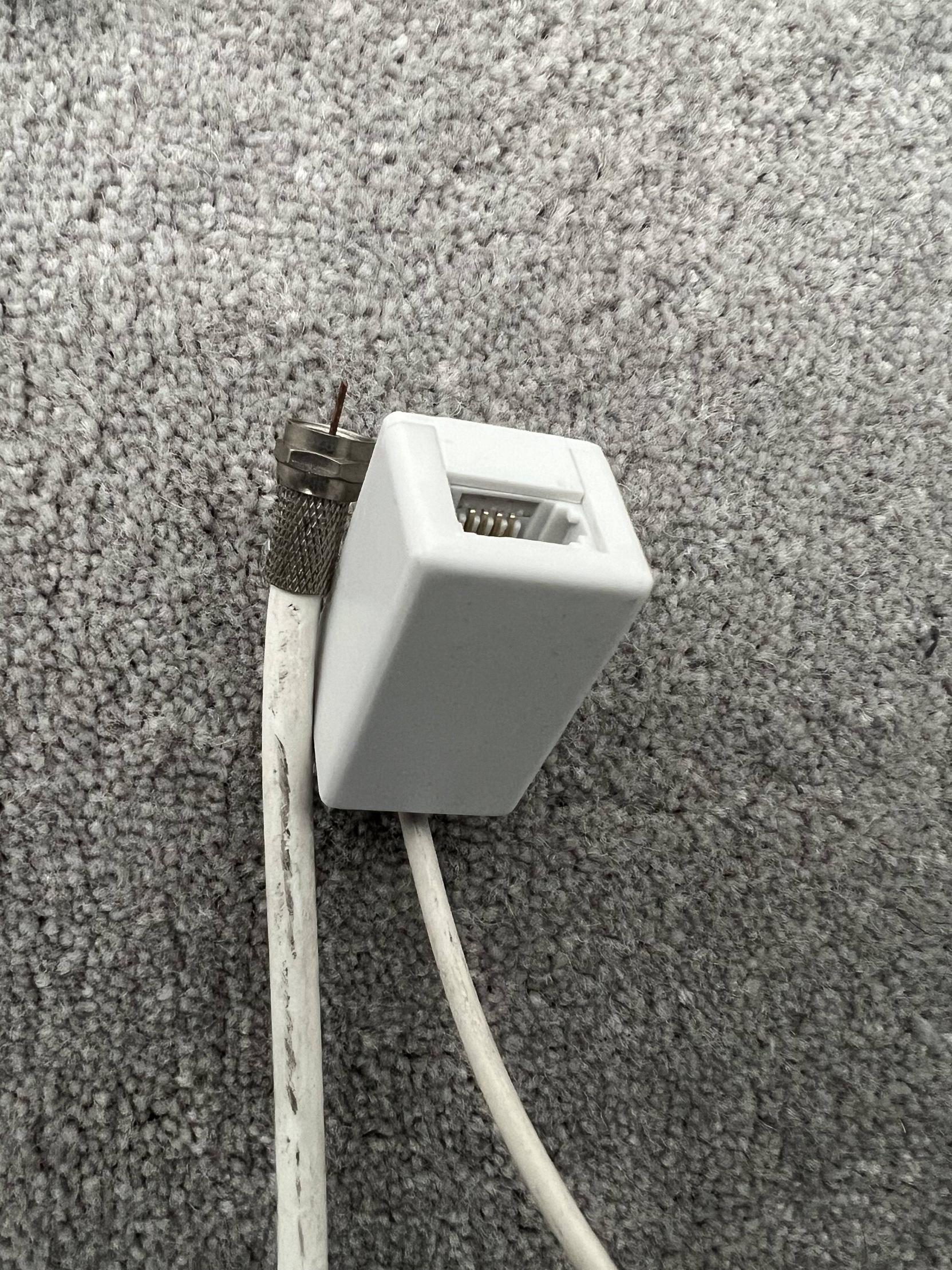
Existing coaxial cable

My questions are:

  1. Can I use some kind of adapter to make either one of these cables compatible with ethernet ports i.e. be able to plug 1 end into my router and the other end into my computer?

  2. Would performance be worse than if I had just used CAT5?

LondonGuy
  • 325
  • 2
  • 8

5 Answers5

24

To answer your question, what you are looking for is a MoCA (Multimedia over Coax Alliance) adapter. It will allow you to media convert from ethernet to coax.

IMHO, I would run new ethernet cable as you'll get much better performance with less points of failure. MoCA's have performance claims that sound great but from reviews don't live up to the hype. Never used one personally and don't plan to.

user71659
  • 1,278
  • 8
  • 11
beswald
  • 621
  • 4
  • 8
10

Wifi gets me to 800Mbps.

Excellent, this isn't good enough?? You could try getting a better WiFi router.

FWIW, I have gigabit fiber Internet and I cannot achieve the full 1000 when hardlined. I think I topped out at like 850 but have been on WiFi ever since so it doesn't matter.

My service provider even states "Up to 940/880 Mbps." Gigabit Internet is just a nominal name much like how two-by-four lumber is not actually 2 inches by 4 inches.


For reference, 4K streaming takes about 25Mbps; 8K streaming would need about 50Mbps.

I'm really struggling to figure out in what scenario you would notice a difference between 800Mbps and 1000Mbps. Most online services cannot serve you content at this speed anyways so your download speed is limited by their upload speed.

At this point, the only benefit of hardlining would be ping times. If this is important to you then powerline adapters are the worst choice.

If you're going to run Ethernet then don't do Cat5, run Cat6 at minimum.

If you're feeling lazy then get a really long patch cable and run it from the router to your computer; 100 meters is allowed. Tuck it under carpets and staple it into corners.

MonkeyZeus
  • 17,328
  • 2
  • 27
  • 64
6

I just bought a house with the same situation, coax but no Ethernet. I bought pairs of these: Deca 100mbps Ethernet to Coax adapter: https://www.newegg.com/p/1BV-0034-00006 Basically puts Ethernet over coax back to Ethernet again.

I put one on each end of a coax line from the central distribution point to the room the coax goes to. (Note I removed the distribution splitter, and put the deca's on each end of the single coax line. They may work through splitters. They do work through couplers.)

They give 100mbps nominal. Enough for internet for my family's needs. One pair and the cable goes to one room for wired Ethernet (80mbps download speed of a gigabyte file from the family file server). The other pair goes to another room for a Wi-Fi Access Point (60mbps download speed of the gigabyte file, reduced probably from the Wi-Fi connection).

(Not a product endorsement, I'm not affiliated with the seller in the link, just got the items and they work. I don't have DirectTV and no TV service is needed.)

Triplefault
  • 13,096
  • 1
  • 21
  • 52
6

To run ethernet over coax you indeed need an "adapter" such as MoCa which converts ethernet into radio signals. This is explained well in the other answers.

One may be tempted to use the coax as a two-lead wire to run single-pair ethernet. This is theoretically possible over a very short range, but it is not a realistic option for home wiring. Leave this for electronics hobbyists or workarounds in a lab.

In general, coax provides superior attenuation over twisted pair wiring, but the ethernet interface is optimized for one or more twisted pair wires and will perform poorly when applied directly to coax. It has to mostly to do with the physical/electrical properties of the wire and whether the ethernet circuitry is designed to get the most from it.

So your options are to rewire with Cat 5 (best), get MoCa, get powerline adapters, or rely on WiFi.

The throughput achieved with powerline very much depends on the specific situation with your home electrical wiring. If you go down that route you should prepare to do some specific plug & play experimentation with the product, leading to a possible return & refund.

In our house we get all the streaming throughput we need wirelessly. I ripped out the old coax, and made some provisions for Cat 5 or whatever is coming in the future, but never used it. Your wireless throughput will of course depend on the size & layout of the house, the building materials, and spectral congestion in your neighbourhood. Your options to improve WiFi are to upgrade your WiFi router, install WiFi boosters or add a second WiFi router for the far reaches. WiFi will save you from pulling wires, can easily be boosted, and just about any new internet device has a wireless interface anyway.

P2000
  • 16,250
  • 1
  • 33
  • 55
2

Frame Challenge - does the question hold if stated "Can I use old wire to pull new ethernet cable?"

Get an assistant to pull one end of the cable while you watch the other end closely. If it slides then the coax is not stabled in the wall, which is good.

Secure your new run of cat6 UTP to the coax, and pull that through the same path in the wall. Overlap the wires by at least 30 cm, and use plastic/PVC insulation tape to join them. Try and eliminate any ledges or hooking areas, and you can stagger the start of multiple by 5 cm. Don't use greases, that's not going to help.

Lay out your run of UTP beforehand. If you only have one box, you'll have to cut any second pieces to length - be generous, wire is cheap. Organise the lay so it lies smoothly with no coils, and when feeling into the wall use your hands to help it. You will absolutely need a helper.

The risk is that the join parts inside the wall leaving you with nothing going through. Mitigate that by pulling a drawstring attached to the coax separately. Nylon rope works well as a drawstring - you'll leave this in the wall for a future need.

If you can pull two cat6 cables through, that gives you some future-proofing. Run all UTP lengths back down to a single central point in the house where you can put an ethernet switch - this doesn't have to be where the router because you can use one run as a router-switch cable. Hopefully you have roof-space access.


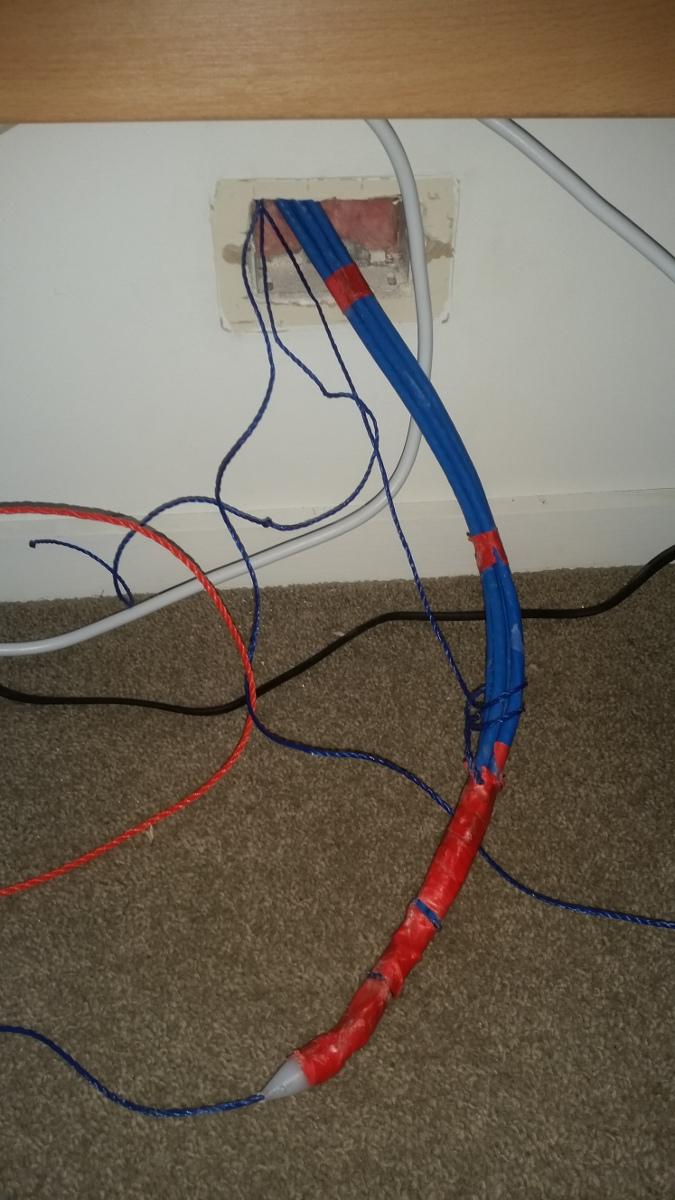
Here's me replacing 1 coax with 4 cat6. I ended up having to make a "nose-cone" from nylon to stop it hanging up at the dwangs/nods. It is always easier to pull downward with gravity where possible.

enter image description here

Criggie
  • 11,950
  • 2
  • 26
  • 79