5

I want to split the incoming phone wire across 5 rooms. For ethernet, I use a simple Netgear switch fed from my cable modem and then 5 ethernet connections going out of the utility room to each room of the house. But when I searched "phone switch" on both Google and Amazon, I was getting Netgear ethernet switches in results and nothing for phone/cat3.

What is the phone/cat3 equivalent of an ethernet switch? I want it to have female cat3 jacks just like the Netgear has femalele cat5 jacks. I want it to be exactly the same as Netgear except phone/cat3.

amphibient
  • 7,702
  • 52
  • 152
  • 238

6 Answers6

19

You are over thinking this. POTS (Plain Old Telephone Service) doesn't need a switch, a modem or a router. You just connect all the cat 3 (RJ11 jacks presumable) in parallel from one to the next. POTS wiring has been doing it this way for decades.

OK, that said: If you want to do any "future proofing" you should consider running cat-5 or cat-6 with each jack going to a central point (star config) where the POTS service comes in. Then simply connect all the POTS lines in parallel. If you wanted to get a bit more fancy, get a low voltage cabinet and a punch down block to make the connections. So if you eventually give up on POTS service, which many of us have, you'll have the wiring in place to upgrade to LAN/ethernet/internet.

Again, if you want to keep it super simple, just run the cable from one POTS (RJ11) jack to the next. It won't be future proof though.

George Anderson
  • 23,304
  • 5
  • 41
  • 83
9

Waste of money, but feel free.

A pair of wirenuts will do the job, unless you have more than one phone line coming in, and phones that understand more than one phone line on a single jack. In that case 4 or 6 wirenuts will do the job.

Or you could get a 6-port surface mount box with 6 jacks and hide the pair of wirenuts inside it. That would "look like" (vaguely) an ethernet switch.

Leviton 6-port surface mount picture from GordonElectricsupply.com no endorsement implied

Connect wires to the green/red or white-with-blue/blue connection points on your jacks, and connect all the blue or red and all the green or white-with-blue wires. Or spend ~12 or more times the price on a manufactured item you can plug in to. I don't recommend that, as it's an extreme waste of money, but PT Barnum is widely alleged to have known why they make it.

Leviton 476TL-T12 picture from GordonElectricsupply.com no endorsement implied

If you're not dead set on having jacks (which it seems you might be) you can simply use a junction box to run all 6 cables into, and hide the wirenuts joining the appropriate wires.

Ecnerwal
  • 235,314
  • 11
  • 293
  • 637
8

Plain Old Telephone Service (POTS) doesn't use a switch like ethernet wiring. Telephone wires are all just connected together - red to red, green to green, etc. Usually it's installed in a daisy chain manner with the incoming cable run to the first location, then on to the next, until all the locations are served. It sounds like you've run the incoming cable to a central location, and then run individual cables to each service point. To connect them together you can use a phone block such as [this] which you can order online 1.

If you haven't run the wiring yet, you might want to use Cat 5 or Cat 6 wiring and terminations. This will allow it to be used for either telephone or ethernet in the future, including VOIP.

manassehkatz-Moving 2 Codidact
  • 139,495
  • 14
  • 149
  • 386
Mark
  • 4,437
  • 2
  • 19
  • 24
6

A DuckDuckGo search for "phone line splitter" (or "duplex phone jack", for a more "correct" term) comes up with a multitude of responses. They all look like this little beauty:

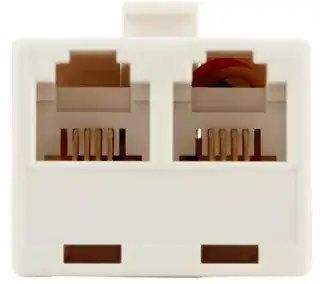
enter image description here enter image description here
images courtesy of homedepot.com. No endorsement intended or implied. Click all images to embiggen.

The HD also sells triplex versions for one in, three out. I'm sure that, at some point in time, one could purchase 4- or 5-output versions of them, too, but fewer people need that many land-line jacks anymore, so they're becoming a bit of a dinosaur.

Internally, these are nothing more than incoming lines to a punchdown block that the outgoing lines are connected to. There are absolutely no smarts inside this thing at all. That's what allows you to pick up two handsets and have a "conference" call at your end.

The good news is that the duplex one (currently) lists for less than $3, so you don't have to pay expensive network switch prices.

If you need more lines, you simply daisy chain more devices.

The other option is to install a puchdown block like this one:
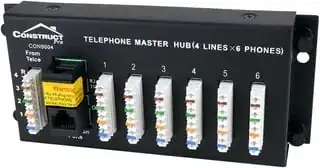
enter image description here
image courtesy of amazon.com. No endorsement intended or implied

You put your incoming line into the blocks on the left (using a punch down tool), then run one line from each of the blocks on the right to wherever you need them. This, plus the tool, are considerably more expensive than the little outlet duplexer above, but are probably more reliable.

For a dirt cheap, DIY solution:

  1. Drill 4 holes into a piece of wood.
  2. Epoxy a nut over each hole.
  3. Run a bolt and two flat washers through each nut.
  4. Strip your phone wires
    1. Clamp all the red wires between one pair of washers
    2. Repeat for the blue, yellow & green wires, each on their own nut/washer/bolt set

You've made your own "punchdown" block. This is, literally, all there is to it.

FreeMan
  • 48,261
  • 26
  • 101
  • 206
5

'POTS' doesn't use switching at all, unlike Ethernet.
Ethernet is point to point, every cable must be terminated at a 'host'.

POTS can be split, joined, starred, anything. So long as all the wires connect eventually to all the end points, it works.

All of these will work…

enter image description here

Tetsujin
  • 11,635
  • 1
  • 22
  • 40
1

I concur with everyone saying it's a waste of money, but a Google search for "telephone distribution tap" produced a bunch of options, like:

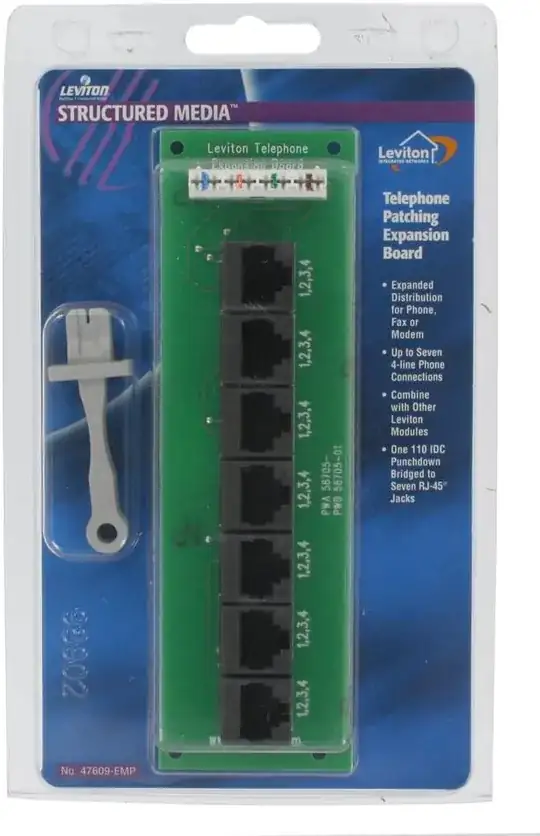
  • This Leviton block, which lets you punch down a single incoming line into a 110 block and turn it into 7 RJ11 jacks:

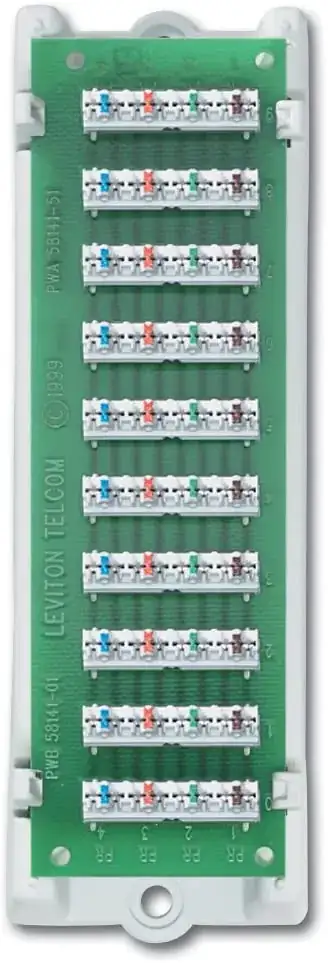
  • This slightly cheaper block that does away with the RJ11 jacks and lets you punch down up to ten cables onto interconnected 110 blocks:

  • And the same box Ecnerwal posted.

FeRD
  • 233
  • 2
  • 10