If you want to also use the wiring for telephones then it gets a bit more complicated. That's because in ye olden times only two pairs were used for Ethernet so it was trivially easy to use one or two pairs for phone and the other two pairs for Ethernet. That is a bit different now. Basically, Gigabit Ethernet needs all 4 pairs. 100 Megabit can run on only two pairs, but that will limit your speed significantly, though whether it will limit it in a way that actually matters will depend on how you use your network.
There are a few pieces to making this work:
Patch Panel
The first thing you need is a patch panel such as this Trendnet from Amazon:
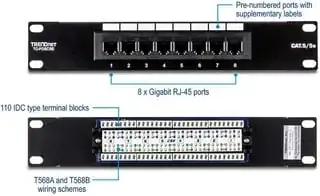
You wire up each cable to the back of the panel. You use short patch cables like these from Amazon:

to connect from the patch panel to your router or switch. You can make your own cables, but for short lengths (at least up to 25') I find that it is not worth the hassle.
You install your router and/or switch (if you need more details on what those are, ask another question) somewhere on this wall.
At the other end - i.e., each jack in a room - you need to see what type of jacks you have. If they are Cat 5e 8-wire jacks then you just need to make sure they are connected properly to all 4 pairs. If they are something else (which is often the case for standard phone wiring, typically a 4-pin jack) then you need to replace the jacks.
Tools
For connecting to the jacks and the patch panel, you use a punch tool like this one from Amazon:

And finally, you should get a tester. There are a wide variety available. Really fancy models can detect line break distance and determine signal quality, etc. But most of the time you just need to know if the wires are connected identically on each end. A basic tester such as this one from Amazon:

will do the job.
One important thing to watch out for: Daisy-chained cables. Regular phone wiring, but not most "phone systems" and definitely not Ethernet, can chain from one jack to the next. With Ethernet, each jack has to have its own "home run" back to the patch panel/router/switch/etc.


