tl; dr: your existing grounds are inadequate. Best way to fix it is to add a ground pigtail from each receptacle to its box. Do the same for your USB-C equipped outlets you intend to swap out.
Why did it test ‘ok’? In the first photo, the metal box is providing the ground, sort of. When the receptacle is screwed down there is continuity from the receptacle mounting tab (yoke), the mounting screw, to the box, through the conduit, and back to the panel. It relies on the screw making contact with the mounting tab.
Using EMT (metal conduit) as a ground is acceptable by code, as long as the EMT was installed correctly (can't tell, let's hope) and the receptacles are set up correctly (spoiler alert: they aren't.)
Problem is, the receptacle ground as shown is not reliable, because the receptacle isn't a ‘self grounding’ type. (We’ll talk about those below.)
Why isn't it reliable? The receptacle can wiggle a bit since the screws aren't torqued down tight to the box (they can't be, the yoke is resting on the drywall.) As a result there's no solid gas-tight seal between screw and the yoke. If a hot-to-ground fault happens there will be arcing at the screw, possibly causing a fire if it doesn't pop the breaker quickly.
You can test this theory by loosening the screws a bit and waggling the tester in the socket. The tester will show that the ground is intermittent.
In your second and third photos where the receptacle is out, your tester will in fact be showing an open ground. A side note: the color coding is slightly weird. Looks like red is hot and gray is neutral, which is ok by code (In the US neutral can be white or light grey, in Canada light gray is only for a 3-phase neutral.) If it tested ok when it was screwed down then your hot and neutral are not swapped.
Back to grounding. The best way to get a reliable ground on the receptacle is to run a grounding pigtail from the receptacle to the box. Like this:
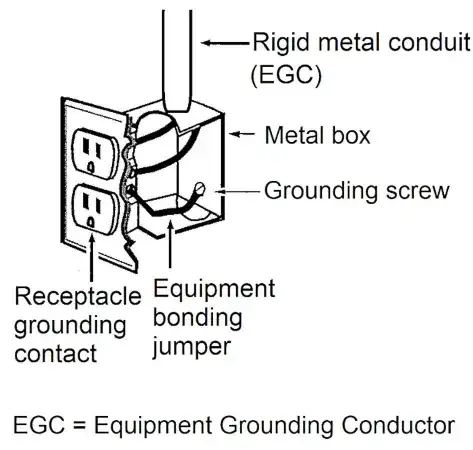
From here: https://eepower.com/technical-articles/nec-basics-connections-and-continuity-of-equipment-grounding-conductors-in-receptacles-and-boxes/
I strongly recommend installing these on all your outlets (existing, and the ones you intend to upgrade to USB-C). Done up this way there's no mechanical issue at all: each receptacle will have a have a dedicated, low-resistance ground connection to the box with a gas-tight seal at both ends of the pigtail.
While installing pigtails sounds like a lot of work, it will take less time to install them than swapping your receptacles to self-grounding types. To save time and labor you can buy bags of pre-made pigtails with screws. You'll also save money since you don't have to buy new receptacles, other than the ones you intend to upgrade to USB-C.
Pigtails: safer, less effort, less money. It's a no-brainer.
Your other option is to replace all your outlets (whether you intend to upgrade them to USB-C or not) with 'self-grounding' types, which have metal tabs on their yoke that make spring contact with one screw. This makes a reliable, wiggle-resistant contact to the screw regardless of whether it's fully tightened down against the metal box or not.
Here's an example:

from here: https://www.homedepot.com/p/GE-15-Amp-Heavy-Duty-Grounding-Duplex-Receptacle-2-Outlet-Light-Almond-42478/306654222#overlay
Notice the price: more expensive than the normal Decora outlet.
What about USB-C with self-grounding? A quick search shows some from Hubbel, Leviton and others. They're expensive - you'll have more choices if you opt to go with non-grounding and pigtail.
That said, I find it somewhat worrying that they failed to properly ground the outlet. Perhaps a DIYer installed the 3-prong outlets in place of a 2-prong ones and failed to run the ground pigtail?


