I am having some difficulty figuring out the correct wiring for my new wifi thermostat. Before I bring out the A/C technician, I was wondering if anyone here might be able to help? Searched other threads and did not see one that applied to my situation...
It is a Honeywell RTH65800WF, watched all of their videos and spoke with their support department and still no luck, so here it goes:
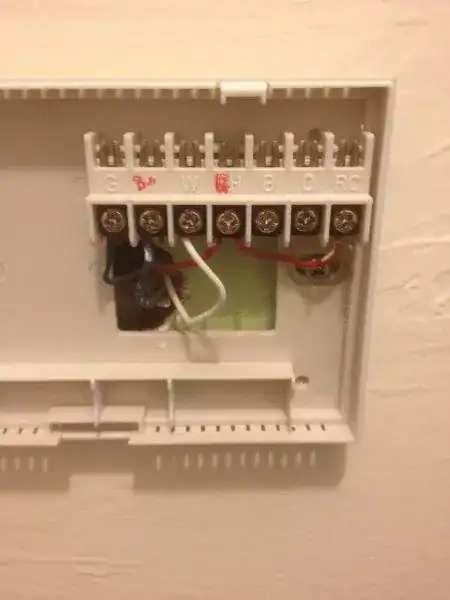
Existing Thermostat Terminals:
- G - Green Wire,
- Y - Blue Wire (previous owner wrote a B next to Y label),
- W - White Wire,
- RH - Red Wire (with jumper to RC terminal) (previous owner appears to have highlighted the R),
- B - Empty,
- O - Empty,
- RC - Jumper to RH terminal
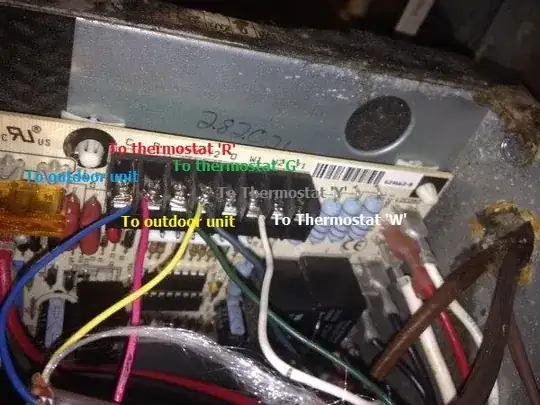
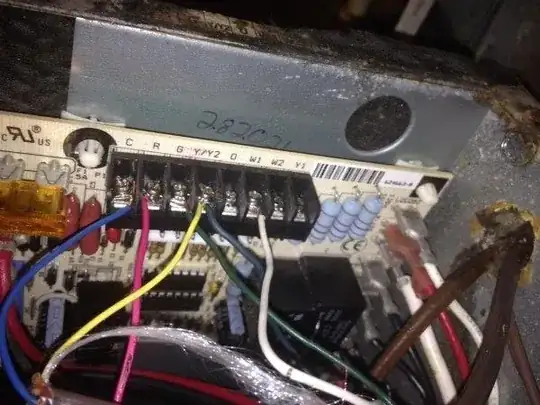
Existing AHU Terminals:
- C - Blue Wire,
- R - Red Wire,
- G - Green Wire,
- Y/Y2 - Yellow and Gray Wires (not sure where these lead to , but I think to outside unit),
- O - Empty,
- W1 - White Wire,
- W2 - Empty,
- Y1 - Empty
New Thermostat Terminals (need to connect to): C, G, Y, W, R
So it appears the C terminal at the Air handling unit (AHU) block is currently connected to the Y terminal at the existing thermostat? Is that possible?
I will attempt to include photos of the AHU and Existing Thermostat terminal blocks:
AHU:
Ex. Thermostat