4

My house is wired for Ethernet, and it uses RJ45 jacks wired with Cat5 cables for POTS. I have no use for POTS, and I'd prefer to repurpose those jacks as additional Ethernet jacks. The Ethernet and telephone cables all end up in a central wiring closet, and the telephone cables are wired to a Channel Vision C-0438 distribution box:

The Channel Vision C-0438 in my wiring closet

To make it easier to repurpose cables (by disconnecting them from the distribution box and connecting them to an Ethernet switch, or vice versa), I am considering replacing this distribution box with a Channel Vision C-0436, which uses RJ-45 jacks. Would there be any disadvantages to this?

(As far as I can tell, each telephone jack in the house corresponds to a cable connected to the distribution box, so I don't think any of the cables are spliced.)

jamesdlin
  • 175
  • 1
  • 10

2 Answers2

6

Yes, you can pull out your existing telco punchdown block and replace it with a suitable block for Ethernet networking.

What you're really looking for is a Cat 5e (or better), T-568A or T-568B compatible punchdown block with RJ45 jacks. That's TIA/EIA-568 revision B, which is essentially identical to the older AT&T 258A (Systimax) standard, which was originally designed for telephone service. T-568A and T-568B are electrically compatible as long as the same standard is used on both ends of each segment. T-568A is still the official data networking standard, but a lot of vendors use T-568B. Whichever; just make sure the same standard is used on both ends of each individual length of cable.

So a typical structured cabling solution works for phones and data networking, although a residential solution may bridge tap all of the phone lines so all the extensions ring together, and that's completely incompatible with Ethernet networking. It's also easy to bridge tap multiple RJ45 ports together in the future if that becomes desirable.

Your new punchdown block

First confirm that those cables in the wall are Cat5e. If they're only Cat5, then you'll only be able to reliably use Fast Ethernet (100Mb/s), not Gigabit Ethernet (1000Mb/s).

You'll fasten your new punchdown block to the back of your media cabinet, then punch your incoming cables down to the new block. There's an example below (picture), but you can literally just walk into a big box store and grab one for $20 or so. Then you'll run short Ethernet patch cables between this punchdown block and your switch or router. T-568B is also compatible with telephones, so this upgrade won't prevent you or the next owner from using those existing wall jacks for telephone extensions later if you want to.
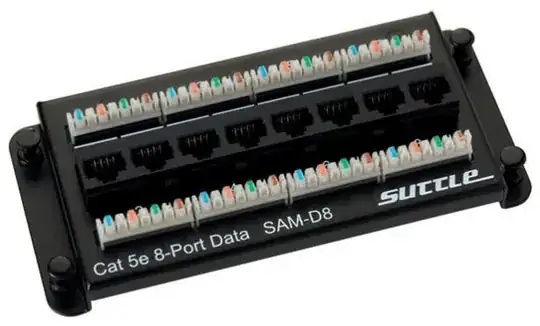
enter image description here

You'll want to confirm that your RJ45 wall jacks are wired up to the T-568B standard.
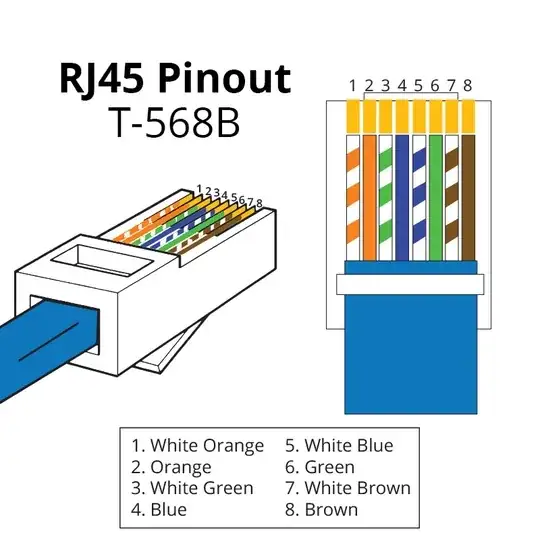
enter image description here

You'll fasten your switch(es) and/or router(s) to the back of your structured media enclosure as well, then you'll use short Ethernet patch cables to make connections from the switch/router ports to your wall jacks.

Someday you might want phones again

If you want to bridge some ports to turn on some telephone extensions in the future, you could easily do it with a little creative crimping of RJ-45 and/or RJ-11 plugs to connect all the right wires, which you would then plug into the RJ-45 jacks you want to connect phones to.

Or you could just buy a telephone interface hub similar to the one pictured below, which lets you adjust which jacks are bridged together using bridge clips. So you would snap on whatever bridge clips suit your purpose, then use regular telephone patch cables (2 or 4 wire) to connect the wall jacks to the telephone interface.

I guess I should clarify that you can plug RJ-11 (phone) plugs into RJ-45 jacks.
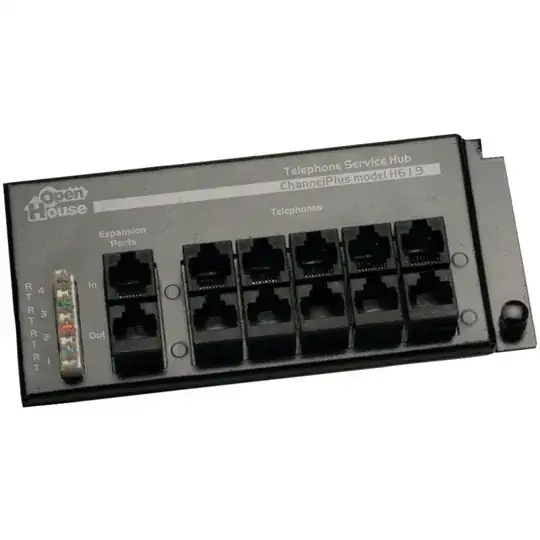
enter image description here

Craig Tullis
  • 6,034
  • 1
  • 19
  • 29
2

The distribution box you show is designed only for telephone signals. If you want to use the cabling for ethernet there are a few changes you need to make:

  1. With POTS telephone wiring all of the wires are connected together. All the orange wires are connected to each other, all the blue wires are connected to each other, etc. That's why every phone in the house rings at the same time.

Computer networks do not work like that. With a computer network each jack needs to be independent and connected to a network switch. The standard way to do this is to have each cable run connected to a patch panel and then run short ethernet patch cables to the network switch. However in a small home environment it is probably easier to just crimp an 8P8C modular connector (a.k.a. RJ45) onto the cable run and then plug that directly into your network switch.

The Vision C-0436 item you link to looks basically the same as the one you have now: everything is all tied together. So it would not be usable for ethernet.

  1. The above point is far and away more important but I also want to point out that the way the wiring is done in your photo is fine for low-bandwidth POTS but not ideal for ethernet networks. You can look up tutorials online for how to "punch down" cabling but in brief you want to keep the cable twists intact for as long as possible and avoid excessive unraveling.

  2. Finally on the other end of each wire you will need to make sure the jacks are wired properly. Telephone signal only uses 2 conductors but ethernet uses all 8. Depending on how it was originally wired you may need to redo the punch-down and/or even replace the wall jacks entirely.

Whatever components you buy, make sure they are rated for whatever your cable type is. Probably CAT 5e (not the obsolete 5) from the looks of it, maybe CAT 6. Cabling, wall jacks, 8P8C connectors, and patch panels are all rated for a certain category.

Hank
  • 14,213
  • 10
  • 46
  • 48