6

Circuit diagrams are very handy. On this site, they can really help illustrate the problem or solution (see here). They can help you visualize what needs to be changed when doing work on your house, and they keep a record of how your house is wired up.

How can I easily create these diagrams, especially if I want a digital copy of them? What simple (hopefully free) programs do people use?

Steve Armstrong
  • 783
  • 1
  • 9
  • 14

8 Answers8

4

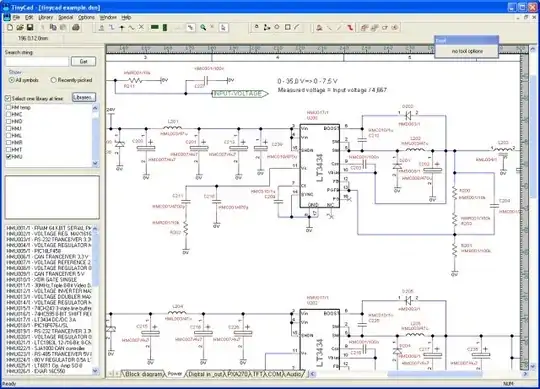
I knew a few EE's who used TinyCAD for circuit diagrams. It might be a little bit of overkill for drawing simpler diagrams though.

The best news is, it's FREE!

Screenshot: alt text

Doresoom
  • 15,873
  • 32
  • 83
  • 122
3

The easiest solution is to draw on paper, then scan or photograph. Even cell phone cameras are usually sufficient. It may not look as professional, but you don't have to install diagramming software and learn to use it.

Vebjorn Ljosa
  • 9,705
  • 19
  • 62
  • 90
1

So to post a formal answer-

The program I used to create the diagram in the linked post was Adobe Illustrator, which is definitely not free.

That being said, any descent vector drawing program can easily make diagrams like these- one free one that comes to mind is InkScape. That combined with a good library of commonly used symbols in SVG format would make creating these diagrams much easier. I have been able to find plenty of typical electrical circuit symbols but have yet to find home wiring symbols. I have several that I have made, that I'd be happy to release if they would be useful.

Edit- another program I have used in the past that is free is xfig, which is a simple vector drawing program for X11 systems. Works great on Linux or OS X, and it includes a pretty big library of schematic symbols.

MarkD
  • 5,155
  • 17
  • 51
  • 61
1

If you use a Mac, then OmniGraffle might work well. It has some basic symbols for circuit diagrams, and you can easily add new ones (e.g., by pasting in some that you find as images on web pages). It's about $100, but there is a 14-day free trial.

Vebjorn Ljosa
  • 9,705
  • 19
  • 62
  • 90
1

I use TinyCad - its free, open source and is very activily supported by users. http://sourceforge.net/projects/tinycad/

BrianK
  • 5,475
  • 8
  • 30
  • 38
1

You can use Kicad - open source and very activily supported by users.

Daniel Grillo
  • 163
  • 1
  • 1
  • 7
0

I have been using Frtitzing. It has a somewhat devent library of components.

It works differently than most. It lets you put parts and wires on a breadboard, then it generates the schematic.

It also does PCB layouts.

Best of all, it is open-source and free.

http://www.fritzing.com

SDsolar
  • 2,007
  • 1
  • 16
  • 24
0

I use TurboCad. Prior versions are available from software discounters for as little as US$20. A Mac version is slightly less.

Dennis Williamson
  • 826
  • 1
  • 5
  • 11