40

I want to install an ethernet jack in an interior wall of one room. I'd like to run the cable up through the wall cavity (so it is hidden) into the crawl space and back down another wall to another jack which would be connected to the network router. I presume this is a pretty basic thing to do but I'm not sure how to access the wall cavity. The walls are covered by a horizontal beam that gives me no clue what is underneath or how high they are.

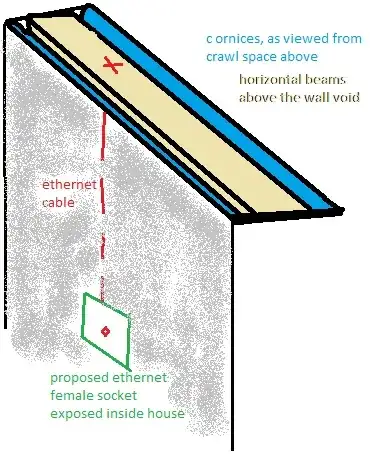
Should I drill down at the red X(see picture) and feed the cable through, then guess the right spot to drill a hole at the site of proposed jack (coloured green)?

Diagram of problem

NB: I have been reading this question but it doesn't quite answer mine: How do I run ethernet, speaker wire, and coax through a wall into a crawlspace?

Lisa
  • 525
  • 1
  • 4
  • 10

7 Answers7

17

As others have mentioned, there may or may not be stuff in the wall obstructing your plan. But most likely not (insulation it the most likely, but should not stop you). Find an area between the studs and cut a hole in the wall where your box will go as other have described. Then drill a 3/4" - 1" hole in top plate within the same stud cavity. That's the easy part.

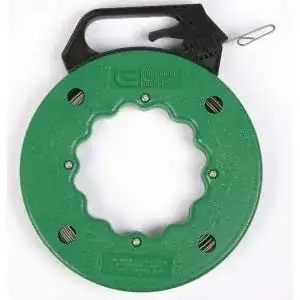
To actually fish the wire (up or down), you really should get steel fish tape. I spent so many years fishing wire without this, and once I discovered them, I realized I could have saved so much time. It is a steel wire that rolls up but does not bend left to right, so you can put it up or down the cavity (down would probably be easier as you can stick your hand in the hole too grab it). One you have it pulled through, attach your wire to the end, and pull it back up. Believe, this will well worth the $7.99 you will spend.

enter image description here

I have also used a contraption that gets attached to the fish tape that is like those old Chinese finger traps you probably played with as a kid. It's a wire mesh that you put you wire in, and then locks on to your fish tape. As you pull, it gets tighter on the wire so it will not disconnect in the wall. Before I had one of these, sometimes the wire would disconnect from the fish tape in the wall and you would have to start over. I could not find a link for this, but it is sold in the big box stores right by the steel fish tape in the electrical section.

Good luck!

mohlsen
  • 6,359
  • 14
  • 39
  • 47
14

To help you with the terms, what you're looking at from above is the top plate. Frequently there are two 2x4's for a top plate. Two boards are used for added structure at the joints and extra fire proofing. This gives you about 3" of wood to drill through.

As ChrisF mentions, you should run a stud finder up and down the wall cavity near the halfway point to see if any fire blocking has been installed. This would be a single 2x4, and will almost always be in a wall if the ceilings are over 8' tall.

You'll significantly reduce the odds of insulation in the wall if you are doing this project on interior walls. You should also be avoiding any electrical in the same wall cavity (between the same two studs). You would see an outlet, switch, or wire coming out of the top plate if this were the case.

As for the actual wiring, I've used these low voltage mounting brackets for the hole in the wall. Place the bracket on the wall where you want the opening, mark the corners and sides, and cut out the drywall with a drywall saw. Test fit the bracket and file back any spots that are blocking you until you get a snug fit. Then bend the tabs back into the wall and tighten them with a pair of pliers. On that bracket, I use a modular plate (these comes with more openings if you need them) and then an ethernet jack mounted in the plate. You can also get jacks for cable, phone, stereo, etc.

BMitch
  • 43,263
  • 15
  • 98
  • 204
10

You already have an accepted answer on how to achieve your result, the only note I would make in addition is that if you want to use gigabit connections down the road ( most computers now are on the 10/100 mbps standard, which cat 5/5e is fine for ) you should run cat 6 cable. It generally costs a small amount more, but is easier than re-fishing a wire down the road.

Stephen
  • 1,955
  • 3
  • 20
  • 26
6

I used to run ethernet cables all over the house... I would star them from a central location where I had adequate ventilation / power for my devices... then I realized that the (Cat5e) results I got didn't justify the time and pain of fishing things around tight areas in the house (attracting sweaty globs of insulation all over my body)...

I have been using HomePlug AV to replace physical ethernet wires with very good success. As long as your power circuits between your endpoints meet the basic requirements1, you should see between 30 - 70Mbps through your power circuits using HomePlug AV 2. The devices I use are made by NetGear, but you could choose pretty much any one that you feel comfortable with; I read reviews on Newegg to filter products like this.

Your total cost out the door to start with a single HomePlugAV connection is about $100; that buys you a pair of the transceivers (equivalent of running one wire). Afterwards, you can incrementally expand in multipoint ethernet fashion on the same electrical phase by buying one more HomePlugAV transceiver for about $50/ea.

A single transceiver looks like this (front / side views)...
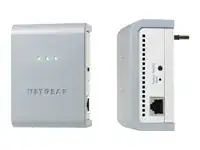
HomePlug AV transceiver

EDIT

In response to Lisa's comment, I will add this bit about my experiences with Homeplug AV...

I have been using Homeplug AV ever since the first commercial implementation shipped on the Zyxel PLA-400 (v1) in 2007. I started using Homeplug AV because I was getting frustrated with 802.11g and unreliable connections; this was in a residential neighborhood and I was only 60 feet from the wifi source (WRT54GL running at max signal strength). As a network engineer, I have very high expectations for reliability, and HomeplugAV has not disappointed at all. I routinely keep ssh and VNC sessions up for months through HomeplugAV links3. The technology uses Forward Error Correction with OFDM, and my apps are all TCP... I have never had a reliability issue, even when the washing machine, vacuum cleaner, or power tools operate on the same AC circuit4. That said, I have never streamed UDP video through this, and that truly would be a different use case.


End-Notes:
  1. The issue that stands the biggest chance of being a problem is if you want to transmit a single HomePlug AV connection across two different electrical phases in the house. If you need to bridge the electrical phases with HomePlug AV, use an ethernet switch fed by HomeplugAV transceivers connected to the two phases. Also be sure you do not plug a HomePlug AV device into a UPS or surge protector... they are only designed to go on basic electrical wall outlets.

  2. Don't believe numbers larger than 70Mbs for HomePlug AV... there is a lot of unusable-bit-count marketing involved in most of the Homplug AV products.

  3. In four years of use, I can only remember dropping one TCP session across Homeplug AV, every other time TCP sockets are manually terminated by me (since there was only one drop I am not 100% sure this can be blamed on HomeplugAV). I immediately restarted the session, and have not had another problem.

  4. Initially I used it through 2-wire romex laid in the 1950s; after I sold that house, I used it in an apartment complex with similarly stellar results (using Netgear transceivers, as my original Zyxel PLA-400 croaked after about 3-years). While some might gripe about replacing the transceiver after three years, I am (so far) not concerned; that Zyxel was literally one of the first units they shipped. I ordered it off NewEgg as soon as they released it.
Mike Pennington
  • 273
  • 3
  • 12
5

One thing I've learned over the years is that cutting and repairing drywall is sometimes easier than the aggravation of trying to run wires through a wall. If you think there is blocking up the wall as ChrisF said or insulation, it may be easier to cut out a section of drywall that gives you the space you need to run the wire then repair the drywall.

If you don't want to do drywall work and have few obstructions, You can follow the directions in the other post you mentioned. Cut out the location for your ethernet box, find a reference point and measure, then go into the crawl space and, using your reference measurement, drill a hole through the top plate. If you're off, no big deal, just move the appropriate distance and try another. Run some fish tape from the top with a hook on the end, then run another, or something else with a hook, from your box location up and hook the top tape. Pull the tape out of the box, attach the wire and pull the wire up into the crawl space. Seal the holes with foam.

billoreid
  • 1,068
  • 1
  • 6
  • 13
3

You can use fish tape to help run the wire. I have a friend that is wicked good at that. I have never tried. I have always just removed trim and baseboards to run the wire from room to room. I cut a groove in the back of the pieces with a router or a table saw with a dado blade.

Evil Elf
  • 4,414
  • 9
  • 54
  • 65
1

Theoretically this should work, however there could be other cross pieces in the framework that would block your path to the location of the socket.

You would need to get a drill bit that could reach all the way down.

There could also be insulation in the cavity that would block your path too.

ChrisF
  • 16,973
  • 5
  • 51
  • 74