72

I am planning a small house (4 rooms, 2 floors, no basement, no attic, 120 sq.meters) and I want to run a lot of LAN cables throughout because of poor WiFi experiences in my apartment.

Because the house will be built according to my wishes (including electrical plans), I can pretty much choose whatever I want. But ... what do I want?

I want to provide at least 2 LAN sockets in each room, plus some more in the living room and underneath the staircase for central infrastructure (DSL modem, NAS, WiFi, media center). I will also have at least 2 desktop computers, three audio devices, and a handful of wireless devices (laptop, smartphones). Clearly, a regular DSL modem with 4 LAN ports and WiFi won't be enough.

I have no idea what kind of Internet consumption and local network usage a family of 4 would have many years from now, and this is the only chance I'll get to make smart preparations.

What considerations should I include in my network planning?

  1. I guess it would be smart to have a switch, right? I'd place it under the staircase along with the DSL modem, WiFi AP, NAS, and other central headless equipment.
  2. Would a patch panel be useful, or is that only used in large office buildings?
  3. Is it stupid to plan 2 LAN sockets per room? I figure 1 is not enough, but 4 is too expensive.
  4. What's the recommended minimum distance between electrical and LAN cabling? We don't build using "studs" in Europe (we mostly use bricks), so an actual measurement would be helpful.
  5. What am I forgetting?? There's always something that you only learn from bitter experience. I'd like a head start.

My goal is not a show-and-tell geek project. It needs to be reasonably affordable but also future-proof for the next 10-25 years as best as possible without introducing fiber or some such.

Torben Gundtofte-Bruun
  • 1,367
  • 5
  • 15
  • 23

14 Answers14

50

First off, your cabling doubles as your telephone wiring, so 2 per room is reasonable. Put a jack anywhere you think you may need a phone, computer, or media device (TV/Boxee/game console/etc). If you know you are going to likely need a couple at some particular spot (eg, a home office, or your main TV watching area) then you can do that as well.

Run all the cables back to some main wiring closet or utility room. The "nice" way to do it is with a patch panel, but you certainly don't have to go that far. You can get away with just terminating the ends with regular jacks. In your wiring closet, you'll have a switch of some sort (either the 4-port switch built into most routers, or something bigger if you need more than 4 ports). You'll also need a small patch panel for telco wiring for your analog phones. If you want a particular jack in the house to be on your network, plug it into the switch. If you want it to be telco, plug it into the phone panel. Note you don't need every jack to be active, and you don't have to decide telco or network now.

Here's how I have my house terminated, including patch panel. Note I have a 16-port switch, then the patch panel. There's only one analog telco line (port 4), the rest of my phones are VoIP (there are two power injectors on top of the switch for a couple of those phones).

enter image description here


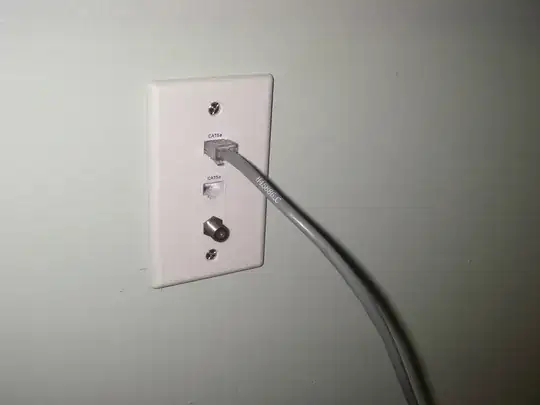
You may also consider running coax (RG-6) to TV areas, for use with cable or satellite, and you can terminate in the same boxes as network cables if you want. In my house, I have a box with 2 Cat5's and a coax in every room, but I would probably split them apart so there was one on each side of the room if I could. In my case, I was retrofitting most of the house and mostly just did interior walls.

enter image description here

In my opinion, Cat5e is good enough (it supports gigabit), but Cat6 works too (I personally don't think it's worth paying any extra for).

I would not be overly concerned with noise in a residential setting. Twisted pair wiring is resistant to noise anyway. Try to avoid prolonged parallel runs (less than 6" apart), but even if you do you're not likely to notice any problems.


As far as future-proofing, one word: Conduit.

Who knows what cable tech will be used 10 years from now. Install what is useful today. If you want to run a 1 gigabit network, and a couple 1080p video links to a flatscreen on the wall, then install cables that can support that. By the time 4K or holographic video or whatever is "current" 10 years from now takes over, there's a good chance there will be new cabling standards and all the most expensive cutting-edge cables you can buy now will be obsolete.

Case in point: 15 years ago, 10 Mbit was a common ethernet speed, and 100 Mbit was high-end. 802.3ab (gigabit over copper) was only introduced in 1999. 10 years ago, YPbPr component video was top-dog (HDMI only came on the market around 2003), and now it's getting hard to find gear that even has component video connections.

If you can afford it, sure, install Cat 6 or even Cat 7, but you have to realize any extra you spend on it is basically a bet that in 10 or 15 years, there is not going to be some new standard or totally different technology that makes it all obsolete. There's also a chance that you won't need it: I have gigabit throughout my house, but some of my (within 1-year-old) end-points (such as VoIP phones, and media streamers that play 1080p video) still only have 10 Mbit connections, because that's all they need.

gregmac
  • 29,300
  • 17
  • 89
  • 162
44

You have good answers so far, but I have several items that I don't think have been covered yet. I will start by recapping.

Number of Cables per room

Cat5e (and cat6) can be used for telephone, both the old school phone and VoIP phones. This makes it easier to not have to worry about running as many different types of cables. I would highly suggest going with 2 cat5e + coax to every room and maybe even more to "special" locations. I use a TV service that can run over my network and the extra switches in each room add enough delay to cause the TV service issues. Having 2 connections in each room would have allowed me to plug the TV receiver in directly with out the extra switch, unfortunately I only have 1 cable per room so I have had to be creative with my setup.

The special locations to add additional cables would be places that you plan on having lots of electronics, like maybe in your living room. In my living room I have the TV, XBox, Wii, Blu-Ray player, TV receiver, and media center PC all with network capability. 6 lines probably would have been over-kill, but 4 lines would have been nice at that location. Some people also like to add extra coax in rooms that they have TVs. This can allow you to use multiple technologies such as satellite, cable, or antenna.

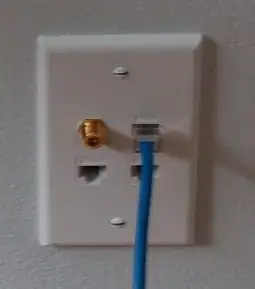
In a prior house I added 3 cat5e and 1 coax to every plate. Every room got 1 plate except for the living room and the office which both got 2 plates. This setup worked out very well for me.
enter image description here

Location of the "Rack"

As for the location of the "server closet", a patch panel does make things much easier to plug in. It also makes it easier if you need to connect it to an old school POTS phone line. There are some structured wiring solutions (see examples) that will make your wiring a bit more geared toward home use over a patch panel. There really isn't and huge advantages of one over the other though.

In a prior house, I added network cables and a patch panel to a closet. This picture was taken way before I finished the job, but you will get the general idea of it. I dropped all of the cat5e out of the left conduit, the coax out of the right conduit, and the middle conduit was the "service" lines (ie cable from the phone company, cable company, and eventually my antenna). The conduit didn't really go anywhere other than up into the attic, it just provided a neat way to transition from the attic to the closet while being able to get above my insulation and not having it falling down into the closet. I eventually used some spray foam in the conduit to seal off the heat that I had leaking into the room from the attic.
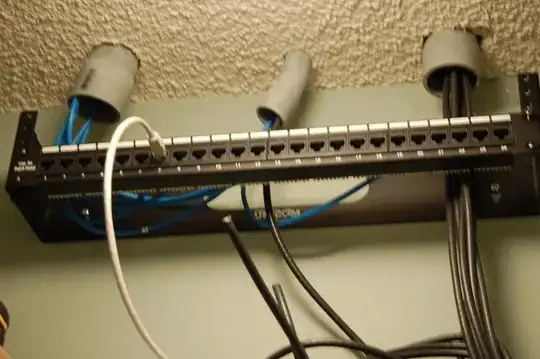
enter image description here

I then mounted my router and wireless access point to the wall.
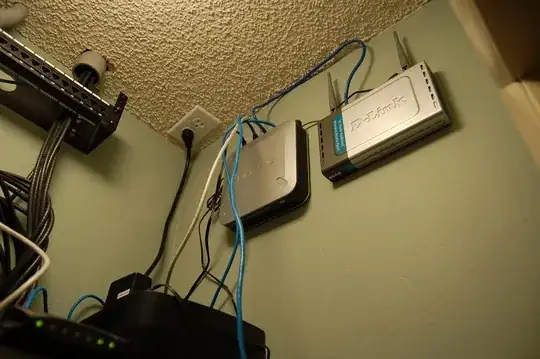
enter image description here

There was already a shelf that is just off the bottom of the image that I placed things like my battery backup on.

I would recommend thinking about where your electronics will be placed. Will they be able to get enough circulation with cooled air? The last thing you want is to be replacing a modem every few months because it keeps over heating. You will also want to make sure that it is some what centrally located. This will help keep the run lengths down and thus save you money. It will also allow for you to place the wireless access point near the source of the rest of your equipment while still being in the center of the area that you are trying to cover it with. The pictures I showed were in a front entry closet that was very centralized. I had great WiFi coverage, but it would get pretty hot since there was no circulation. I did have 1 router fail, but I am not sure if it was because of the heat or not.

Distance between Power and Data

This distance between power and cat5e isn't a huge deal. 1 foot apart is probably more than enough, but to be safe you could go 16 inches or more. I am not sure how your house can have no studs, but getting it to the other side of what ever is supporting your walls is typically plenty.

Future Proofing

If you are really wanting to be future proof, you could run conduit to every location that you have Cat5e running to. This will make it very easy to add new cabling if in lets say 20 years everyone is running fiber to everything. It will add more cost, but potentially you could run less of the "just in case lines" and wait to run those until you actually need them. Probably wont offset the cost completely, but at least something to think about.

Depending on your setup, a straight run of conduit into the attic might work perfectly fine, or you might need to run it all of the way back to the "rack". Whatever the case is, make sure you will be able to easily get new cable into the conduit. This may be leaving a pull line in the conduit or enough room to use a pull rod in the conduit.

Personal Thoughts

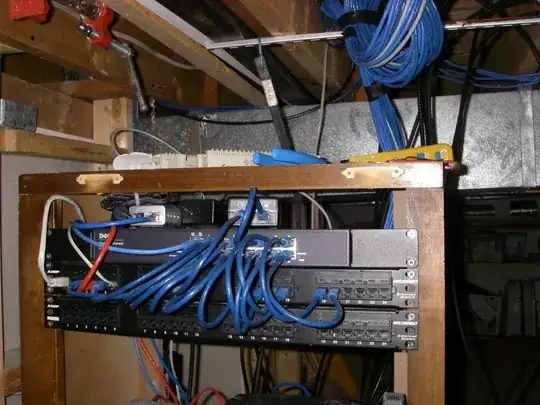
As a side note, my personal feel is to put everything wired as I possibly can. This makes the performance of my wireless devices (laptops, phones, etc) much better and the wired devices much much better. As for the switches used to get up to the number of hardwired connections you need, the rule of thumb you should follow is the less switches the better. You would be a lot better off spending some money on a single larger switch than to have a bunch of smaller switches wired together to get you up to the count you need. It will typically work having many switches, but it is a nightmare to troubleshoot if anything starts acting up.

wallyk
  • 12,399
  • 3
  • 24
  • 51
Kellenjb
  • 2,090
  • 5
  • 22
  • 29
18

Before you spend too much time and money on this, buy a new wireless router. They've come a long way. When finishing my basement I added two communication drops to each room and...never used them. Wireless was fine.

What's more important than the cable is that you have an easily accessible way to run what you need at a later date. Smurf tube is a common way to handle this (blue plastic tubes that run to every A/V outlet) along with pull wires within it.

DA01
  • 24,586
  • 30
  • 82
  • 153
10

2 Cat5e drops to each bedroom. You can put them in the same faceplate; you can also put your coax cable for the tv / receiver in that panel also (including phone) - Leviton makes face plates that accept from 1 to 6 universal connections (this can be rj45, rj11, coax, etc...)

You need a switch regardless to break out your modem (be it DSL, Fiber, cable modem)

A patch panel just makes things nice and neat. You can get a fully loaded 24 port patch panel from Graybar (if your in the USA) for a couple hundred. Get a 2u wall mount and mount it to the wall where ever you setup this "network closet"

I'd suggest against putting it under stairs; the modem will have to be reset from time to time.

As for wireless, name brand is king. Wifi N standard is pretty cheap now adays. I like Linksys and Netgear. N is good to cover the entire house for sure, but if your concerned with coverage, I'd have the builder put power and cat5e in the ceiling of the family room and then in the hallway on the 2nd floor, and mount your access points to the ceiling.

If their the same brand access points, you can name them appropriately; F1, F2, whatever. Make the WEP passwords the same and it'll be easier when you switch between networks.

I'd also say, anywhere you have a coax cable for tv, run atleast 2 cat5e there; I have a lot of "toys" and so my family room is host to all 3 current game systems and an Apple TV 2 so I have 4 lines by my tv.

We only use wifi for laptops and ipads / iphones in my house. Any desktop pcs (which are slowly being decommissioned) are hard wired over cat5e, and even when i'm on my laptop, i'll opt for a cat5e cable across the room than to use wifi. For me and my side work, its just faster and more reliable.

And make sure the electrician (I'd honestly find a sys admin or some network engineer do the drops for you, but thats just me) labels everything properly. Even simply numbering the faceplate jack with a 1 and labeling the patch panel with a corresponding 1 will make trouble shooting problems someday all the easier. There's nothing a tone generator can't find (usually) but proper labeling is key to any working network.

And yes, I'm a sys admin / network engineer, so this suggestion might be a bit biased :)

-Mario

lsiunsuex
  • 2,843
  • 8
  • 29
  • 34
8

Wire is cheap, opening up walls later is expensive. I would lean towards running as much cable as you think you might need, even if it isn't terminated, and just coiled behind the wall, or in a junction box with a blank plate on it.

Another tip, not just for cabling, is to take pictures of the pipes, wires, etc, before the walls are closed. This will be useful in the future when you want to know what is there.

KeithB
  • 801
  • 1
  • 6
  • 7
8

Lots of other good answers here, so I only have a little to add:

Conduit is the only way to ensure that you won't regret the wiring choices you make today. Oversize it if you can, so it's easy to pull, including Cat6 that's already terminated. Leave a pull string in.

If you can't run conduit to all locations, run to a few key spots. For me, that was crawlspace to attic. From one end of the home to the other may be enough to solve Wi-Fi problems, since you can put an AP at each end.

If you're not sure what to pull, pull a bunch of Cat5e. It can do almost anything: network, phone, video. Most people should have a pair of RG-6, but I don't watch TV; I pulled 1 anyway.

Be sure to label each wire. I label my pull box with a number (1, 2, 3, etc.) and put that many stripes on the end of the wire with a Sharpie. I make the same mark 2' back on the wire, so if I cut the end, I don't lose the mark.

Before pulling from a room, I write the room name on each cable ("BED 1", "KIT"), so I'll know which is which in the wiring closet.

After I do a pull, I make those the stripes again (4 times now) and cut in the middle.

Jay Bazuzi
  • 11,778
  • 34
  • 100
  • 143
6

I just want to throw this out there -- you may want to consider running HDMI over Ethernet if you've got a central location for your home theater equipment. It takes two cables per TV (way cheaper than HDMI) and one adapter at each end. These adapters work beautifully and save tons of money on long HDMI cables.

http://www.amazon.com/Tripp-Lite-P167-000-Active-Extender/dp/B001CJ9392

Jeremy White
  • 829
  • 3
  • 9
  • 17
3

I have a serious amount of tech, and my old 1900s UK town house made WiFi a nightmare, so I tried something that I was very sceptical about at first, but has turned out to be an absolute dream.

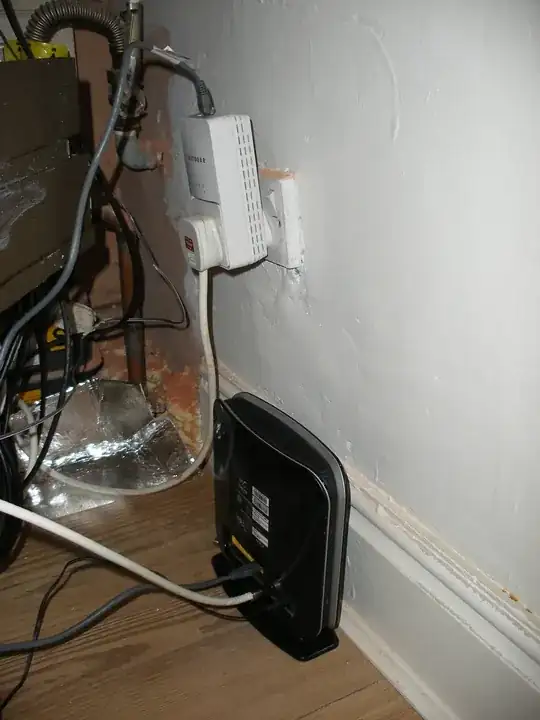
My cable internet enters my house downstairs, which is where my router is. The router is wireless, but I'm not using it for the wireless capability. An ethernet cable is used to join the router to a Netgear Powerline port, which simply looks like a normal power plug. What it does is modulates the ethernet signal into the house's mains power.

Before laying expensive cabling that could quite easily go out of date very quickly, seriously consider this option because all houses already have a fully isolated wired network into all rooms: the mains power.

I won't go into details of how the ethernet is modulated into the power cables (as I don't really understand myself). All I can say that is even in my pre-1970s dodgy UK wiring, I have had absolutely no problems with speed/packetloss/etc.

My network setup:

The router sits downstairs, and it's first ethernet port goes straight into a cheaper model Netgear Powerline.

IMAGE

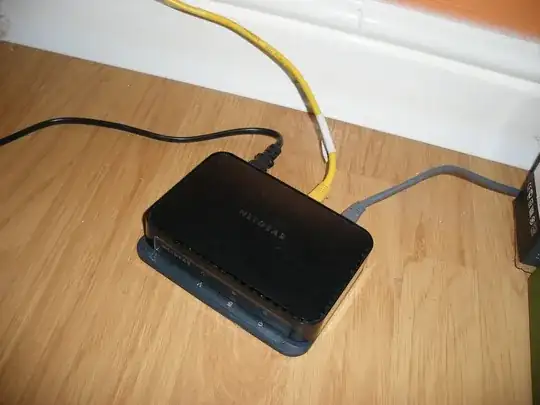
Then in every room I require an ethernet connection, I have purchased a Netgear Powerline switch, which requires only one cable! It's own power source also acts as its network source, so by simply plugging the little device into the power, it automatically works as a network switch.

IMAGE

That's about it really. I now have a fully wired network house for less than £100, and I can't fault it at all.

BONUS: I also have a network point in my garden shed, as we wired power there a few years ago for the lighting. :)

Greg
  • 193
  • 1
  • 1
  • 9
2

Some follow-ups and extensions to Greg and Mario

Preface

You can not in any way build LAN-infrastructure, which will not be outdated for 10-15 years in future, you can only decrease gap and frequency of upgrades, using top-tech today's solutions.

Face

Because upgrades are (will be) severe necessity, don't hide wires under the wall - cable channels are usable, easy and cheap re-mountable (comparing to concealed wiring) and better-looking (comparing to open cable harnesses on plinth) solution.

I strongly recommend to have internal net on fiber in order to have a larger reserve of bandwidth for growth (local and Big Net): 5e is "sometimes gigabit, under greenhouse conditions", 6 is "only gigabit", while we have 10G in real life even now. Fiber will free you also from having to worry about the noise and interference.

All your network-equipment must/better if have to be now IPv6-ready (dual-stack isn't in a must-list)

For LAN-sockets per room I, in order to avoid headache, will think maybe about (micro) patch-panel per room, from which cables laid (in cable-channels) to sockets (and amount of sockets can be increased, when needed)

Lazy Badger
  • 121
  • 2
1

An answer for the space between data and electric would be keep it a couple of feet apart. I have nothing to base that on, but it is pretty logical when you don't have stud bays. I recommend that you use ENT, Electrical NON-Metalic Tubing for running your cables in. It will protect your data from disturbances from power. A good rule to follow is that when you cross electrical and power to do at 90 degrees.

I recommend that you run extra ENT for future wiring. It can be used for both power and data, but not both in the same conduit.

Also see here and the comment @gregmac gave original poster.

lqlarry
  • 7,617
  • 1
  • 20
  • 37
1

Remember to check network specifications (ccna stuff etc.). Such as max. cable length (100 meters for cat5 I think, been a while since I looked at this stuff), minumum radius for turns etc. I think they have also distances between data and power cables.

Mark both ends of a cable with an id so you won't have to guess which end belongs to which cable etc.

Keep in mind that due to use you will eventually have to replace the sockets (that break) in the rooms. So set that up in a way that you don't have to keep cutting the cable bit by bit as you attach the new socket.

And since you're in charge of the specifications, you can consider if you want the power/data sockets a bit higher at desk height if you find that more comfortable or useful. (I personally hate having to kneel and play under my desk to plug and unplug stuff).

frozenkoi
  • 111
  • 1
-1

Have you considered powerline networking, for example BT Homeplugs? This uses the electrical circuit in the house as the network cabling.

I recently ditched the WiFi in my three-story house. I now have the broadband router right beside where the phone line main socket is, flooding the downstairs in lovely WiFi. I then have a LAN cable from that into a BT Homeplug, and more homeplugs upstairs where I need them. Works like a charm at high speed and saves you having to dig trenches in walls and run cables.

Unless the electrical wiring is ancient you should be fine.

Alan B
  • 99
  • 1
-2

When people come over to my home, they expect a wireless hookup, so we have one. We also have other devices such as a Wii that use the wireless network as well. This will accomodate the smartphones and mobile devices they bring over. We have a hybrid type of system. We have a hard line to our main computer and one to our media room. Everyone else uses the wireless access point (router). That keeps them off of our computer as well. My setup is pretty simple, we have a cable modem coming into a netgear N900 wireless router. The router has 4 hardline slots which is more than enough for our needs.

I think at most you will need one hookup per room, 2 or 4 seems like overkill. Switches and patch panels seem to be overkill as well.

A standard cable or dsl router usually has 4 open slots, that should cover the rooms you want hard line access to. If you need more than 4, then more heavy duty equipment is needed. I don't know your needs are, but ask yourself how many people or devices will be connected at once with hardlines?

Also, keep in mind more and more companies are building WIFI into thier products instead of a hard connection. I know you had a bad experience with WIFI but they make range extenders to help with the connection.

I would focus on having a good WIFI system in place with hardlines as needed. I am not sure of the minimum distance required, but your local electrical code(s) should have details.

Jon Raynor
  • 3,586
  • 4
  • 26
  • 28
-2

I would use at least 6 Cat5e/6 outlets per room as a min, using PoE certified and plenum cable. With all the devices using the Internet these days even 6 per room might not be enough in the long term. Think about what the entertainment area looks like today. TV's now plug in for updates or web content. Blu-Ray players need it for updates and interactive content. I use 12 ports in my bedroom alone. Fridges are starting to get Ethernet ports too. Just think about the Washer which will be able to email you that the cloth are done. The conduits is def the best advice given here so far. But don't cut short on the outlets to each room. You don't need to need a switch port for every port in the house until you are using it. Having partial PoE can be handy though for security cameras and future devices that can run on PoE to avoid power outlets. And plenum is just for safety so if you had a fire in the house the cables would not help it spread from room to room via the conduits.